Bitaxe ASIC: Connection Setting
13/05/2026
ASIC Bitaxe Gamma — Home Solo Miner
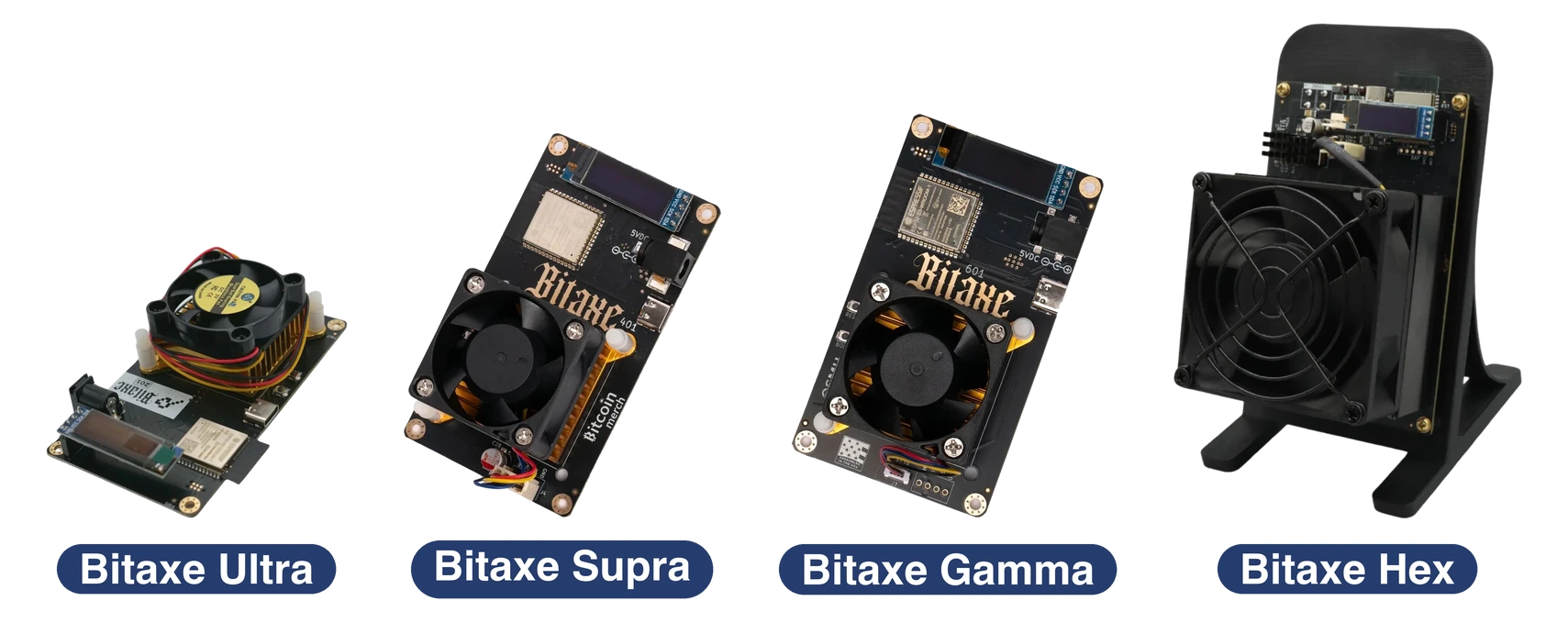
The Bitaxe Gamma is a compact, open-source ASIC miner built around a single Bitmain BM1370 chip — the very same chip used in the Antminer S21 Pro. It is the most accessible SHA256 miner on the market today: silent, drawing only ~15 W, and ideal for solo mining, where you mine alone and, if you get lucky, take the entire block reward.
Bitaxe has several series (Max, Ultra, Supra, Gamma). This article covers the Bitaxe Gamma series as a whole. All Gamma models (Gamma 601, Gamma Touch, etc.) are built on the same BM1370 chip, run the same AxeOS firmware, and follow the same configuration procedure — the instructions below apply to any Bitaxe. As a concrete example, we use the flagship of the series — Bitaxe Gamma 601 — and connect it to the Kryptex Pool for solo mining of BCH, BSV, XEC, DGB, and FB.
🔧 Who is the Bitaxe Gamma for?
- Enthusiasts who want to try solo mining as a lottery and potentially win a full block reward.
- Anyone looking for a quiet, compact home SHA256 miner (~15 W, near-silent operation).
- Open-source hardware fans: schematics, AxeOS firmware and BOM are public — the device can be built and customized.
💎 On the Kryptex Pool, the SHA256 Bitaxe Gamma ASIC can mine BTC, FB, XEC, DGB, BCH, BSV, and QUAI SHA256.
✅ Merged mining of BTC+FB is also available — mine Bitcoin and Fractal Bitcoin simultaneously.
- Mine Bitcoin Cash BCH (SOLO) — https://pool.kryptex.com/bch
- Mine Bitcoin SV BSV (SOLO) — https://pool.kryptex.com/bsv
- Mine eCash XEC (SOLO) — https://pool.kryptex.com/xec
- Mine DigiByte DGB (SOLO) — https://pool.kryptex.com/dgb
- Mine Fractal Bitcoin FB (SOLO) — https://pool.kryptex.com/fb
- Mine Bitcoin BTC + Fractal Bitcoin FB — https://pool.kryptex.com/btc
- Mine QUAI SHA256 — https://pool.kryptex.com/quai-sha256
Bitaxe ASIC — Specifications
| Model | Chip | Hashrate | Consumption | Noise |
|---|---|---|---|---|
| Bitaxe Ultra 201 | BM1366 | ~425 GH/s | ~11 W | ~35 dB |
| Bitaxe Supra 401 | BM1368 | ~600 GH/s | ~15 W | ~30 dB |
| Bitaxe Gamma 601 | BM1370 | ~1.2 TH/s | ~20 W | ~30 dB |
| Bitaxe Gamma 602 | BM1370 | ~1.3 TH/s | ~15 W | ~35 dB |
| Bitaxe Touch | BM1370 | ~1.6 TH/s | ~22 W | ~35 dB |
| Bitaxe Gamma Duo 650 | 2 × BM1370 | ~1.63 TH/s | ~26 W | ~35 dB |
| Bitaxe Gamma Turbo GT | BM1370 | ~2.15 TH/s | ~43 W | ~40 dB |
| Bitaxe GT800 | BM1370 | ~2.4 TH/s | ~40 W | ~40 dB |
| Bitaxe Gamma Turbo | BM1370 | ~2.5 TH/s | ~36 W | ~35 dB |
| Bitaxe Supra Hex 701 | 6 × BM1368 | ~4.2 TH/s | ~75 W | ~45 dB |
| Bitaxe Hex | 6 × BM1368 | ~6.0 TH/s | ~120 W | ~45 dB |
Bitaxe Hashrate
Across the Bitaxe lineup, hashrates range from ~425 GH/s (Ultra 201) up to ~6 TH/s (Hex) with power draw from ~11 to ~120 W. The higher the hashrate, the higher your chance of hitting a block in solo mining.
All models are built on Bitmain BM1366 / BM1368 / BM1370 chips — the same family used in industrial Antminer S21 / S21 Pro units. Top-end Hex models combine up to 6 chips on a single board.
By default, single-chip Gamma units run at 525–550 MHz clock and 1150–1250 mV core voltage. You can overclock or underclock through the AxeOS web interface.
🔊 Noise level: ~30 to ~45 dB depending on the model — single-chip Gamma is quieter than a desk fan, multi-chip Hex models are more audible.
- Mine Bitcoin Cash BCH (SOLO) — https://pool.kryptex.com/bch
- Mine Bitcoin SV BSV (SOLO) — https://pool.kryptex.com/bsv
- Mine eCash XEC (SOLO) — https://pool.kryptex.com/xec
- Mine DigiByte DGB (SOLO) — https://pool.kryptex.com/dgb
- Mine Fractal Bitcoin FB (SOLO) — https://pool.kryptex.com/fb
- Mine Bitcoin BTC + Fractal Bitcoin FB — https://pool.kryptex.com/btc
What to Mine on Bitaxe
Any Bitaxe model can mine SHA256 coins: BTC, FB, XEC, DGB, BCH, BSV, and QUAI SHA256.
The most interesting use case for devices of this class is solo mining low-difficulty SHA256 coins: BCH, BSV, XEC, DGB, and FB. On these coins you have realistic odds of finding a block in a reasonable timeframe and pocketing the full block reward. The higher your model's hashrate, the higher your chance of hitting a block.
Merged mining of BTC + Fractal Bitcoin FB is also available on the Kryptex Pool — you mine both coins simultaneously in standard pool mode.
Bitaxe Profitability
In PPS mode (pay per share), Bitaxe profitability is modest — from a few cents up to about a dollar per day depending on the model, excluding electricity costs. By design: the device isn't a "money maker" but rather a solo lottery ticket that costs pennies in power and still offers a real shot at finding a block.
The real appeal of Bitaxe is the solo lottery: a single block of BCH, BSV, XEC, DGB, or FB pays off the device on the spot.
👉 SOLO mining calculators by coin:
- BCH SOLO — https://pool.kryptex.com/bch/solo-mining-calculator
- BSV SOLO — https://pool.kryptex.com/bsv/solo-mining-calculator
- XEC SOLO — https://pool.kryptex.com/xec/solo-mining-calculator
- DGB SOLO — https://pool.kryptex.com/dgb/solo-mining-calculator
- FB SOLO — https://pool.kryptex.com/fb/solo-mining-calculator
Solo Mining on Bitaxe
Solo mining is a mode where you mine independently: if your Bitaxe finds a block, you receive the full block reward with no sharing. The Kryptex pool fee for solo mining is 1%.
To enable solo mining, use the wallet format solo:WALLET_ADDRESS.WORKER in the User field of AxeOS instead of the standard WALLET_ADDRESS.WORKER.
⚠️ Important: Bitaxe miners are "lottery" solo miners. Hashrates across the lineup range from ~425 GH/s up to ~6 TH/s, and the higher the hashrate, the higher your chance of hitting a block. Catching a Bitcoin block is statistically rare even for the top Hex model, but for low-difficulty coins — BCH, BSV, XEC, DGB, and FB — your odds are dramatically higher, and solo mining on a Bitaxe genuinely makes sense.
💡 Tip: configure both pool slots in AxeOS for the same coin (primary + backup) but with different stratum URLs/ports for failover.
Bitaxe Gamma Setup
Package contents:
- Bitaxe Gamma ASIC miner — any model of the series (Gamma 601, Gamma Touch, etc.), assembled or DIY kit.
- 5 V USB-C power supply (often sold separately).
- Stand / case (varies by vendor).
Before installation, place the device on a flat, well-ventilated surface. Despite the low power draw, the BM1370 chip runs warm — keep the heatsink and fan clean and unobstructed.
Power on the miner:
- Connect the 5 V power supply via USB-C to the power port on the Bitaxe board.
- The miner boots in ~10–20 seconds.
- The on-board display shows status: Wi-Fi access point name (e.g.,
Bitaxe_F735), hashrate, temperature.
Connect to the Bitaxe Wi-Fi access point:
- On your phone or laptop, open the Wi-Fi list.
- Connect to the network
Bitaxe_XXXX(the name shown on the device display). - The AxeOS configuration page will open automatically.
- If it doesn't, navigate to
http://192.168.4.1in your browser.
Configure home Wi-Fi:
- Open the Network section.
- Enter your home Wi-Fi SSID and password. ⚠️ Bitaxe only supports 2.4 GHz networks.
- Save settings — the miner will reboot and join your home network.
Log into the AxeOS web interface:
- Connect your laptop/phone to the same 2.4 GHz Wi-Fi network.
- Look at the Bitaxe display for its IP address (e.g.,
192.168.1.42). - Open that IP in a browser (Chrome / Safari / Firefox).
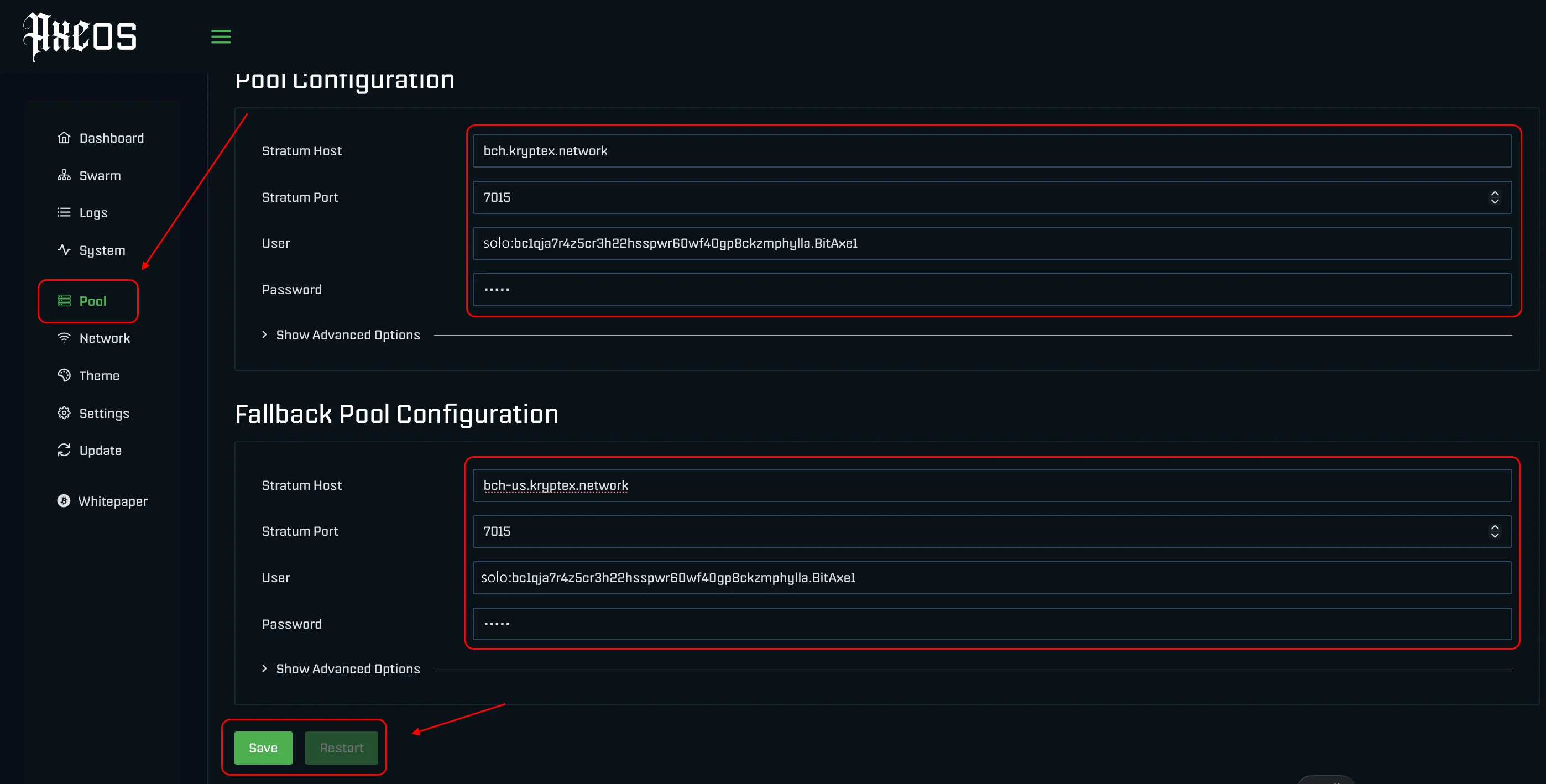
Configure pool settings:
Open the Settings section.
AxeOS provides 2 pool slots — primary and backup (failover).
Fill in both slots so the miner switches over automatically if one pool goes down.
Fields per slot:
- Stratum URL — pool address without the
stratum+tcp://prefix, e.g.,bch.kryptex.network. - Stratum Port — pool port, e.g.,
7015. - User — wallet address and worker name in the format
qzm6...address.Bitaxe601, orsolo:qzm6...address.Bitaxe601for solo mining. - Password —
xor leave blank.
- Stratum URL — pool address without the
ASIC Frequency — leave the default at 525 MHz (can be raised to 550–600 MHz with adequate cooling).
Core Voltage — leave the default at 1150–1250 mV.
Click Save, then Restart — the Bitaxe will reboot with the new settings.
Verify miner operation:
- After the reboot, open the Bitaxe IP in your browser.
- The top of AxeOS shows current hashrate, efficiency, accepted shares, and difficulty.
- Below: hashrate graph, chip temperature, power consumption, pool info.
- After 5–10 minutes, check that your worker appears at https://pool.kryptex.com.
💡 One pool address is listed per coin. Additional regional addresses can be found on each coin's pool page at pool.kryptex.com.
| Coin | Stratum URL | Stratum Port | User — Wallet Address and Worker | Password |
|---|---|---|---|---|
| BCH (SOLO) | bch.kryptex.network |
7015 |
solo:BCH_WALLET_ADDRESS.WORKER_NAME |
x or leave blank |
| BSV (SOLO) | bsv.kryptex.network |
7047 |
solo:BSV_WALLET_ADDRESS.WORKER_NAME |
x or leave blank |
| XEC (SOLO) | xec.kryptex.network |
7036 |
solo:XEC_WALLET_ADDRESS.WORKER_NAME |
x or leave blank |
| DGB (SOLO) | dgb.kryptex.network |
7037 |
solo:DGB_WALLET_ADDRESS.WORKER_NAME |
x or leave blank |
| FB (SOLO) | fb.kryptex.network |
7013 |
solo:FB_WALLET_ADDRESS.WORKER_NAME |
x or leave blank |
| BCH | bch.kryptex.network |
7015 |
BCH_WALLET_ADDRESS.WORKER_NAME |
x or leave blank |
| BSV | bsv.kryptex.network |
7047 |
BSV_WALLET_ADDRESS.WORKER_NAME |
x or leave blank |
| XEC | xec.kryptex.network |
7036 |
XEC_WALLET_ADDRESS.WORKER_NAME |
x or leave blank |
| DGB | dgb.kryptex.network |
7037 |
DGB_WALLET_ADDRESS.WORKER_NAME |
x or leave blank |
| BTC+FB | btc.kryptex.network |
7014 |
BTC_WALLET_ADDRESS.WORKER_NAME |
x or leave blank |
| FB | fb.kryptex.network |
7013 |
FB_WALLET_ADDRESS.WORKER_NAME |
x or leave blank |
| QUAI SHA256 (PROP) | quai-sha256.kryptex.network |
7044 |
QUAI_WALLET_ADDRESS.WORKER_NAME |
x or leave blank |
Bitaxe Gamma Firmware Update (AxeOS)
The Bitaxe runs the open-source AxeOS firmware. Updates ship regularly and improve efficiency, add features (native stratum failover, overclock presets, BIP310 / Stratum V2 support, etc.).
Method 1: Via the web interface (recommended)
- Log into AxeOS via the miner's IP address.
- Open System → Firmware Update.
- Download the latest release from the official Bitaxe GitHub — the
esp-miner.binandwww.binfiles. - Upload them one at a time via the OTA Update (
esp-miner.bin) and Web Interface Update (www.bin) buttons. - Wait for the upload and reboot to finish — do not unplug power during the update.
Method 2: Via USB / serial (for DIY builds)
- Install
esptoolor use the web flasher at bitaxe.org. - Connect the Bitaxe to your computer via USB-C.
- Flash
esp-miner.binusingesptoolor the browser-based flasher.
⚠️ Do not disconnect the miner during a firmware update. If AxeOS gets bricked, use USB-C recovery mode and re-flash via esptool.
Need Help?
Have any questions, something is unclear, or you can't connect?
Contact support — we're happy to assist!
Email support at support@kryptex.com.