






Bitcoin Mining with a Kryptex Account
10/11/2026
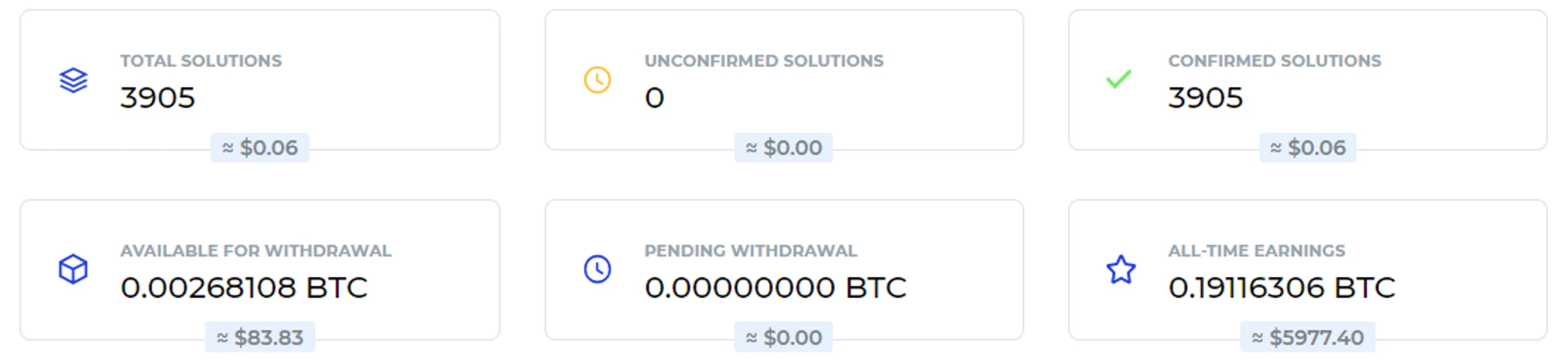
When mining on the Kryptex Pool, you can receive payments to your personal Bitcoin wallet or your Kryptex.com account.
All rewards will be credited to your Kryptex account and stored in Bitcoin.
You can request withdrawals using various methods from your Kryptex account:
- in USDT (BEP20, TRC20), starting from 1.5 USDT with a minimal fee;
- in BTC (including Lightning);
- in ETH, LTC, USDC (Polygon), BNB (Smart Chain) and TRX.
The Kryptex personal account is not a bank, exchange, or currency exchanger. You can only fund your Kryptex account by mining, and only withdrawals are allowed from your Kryptex account.
Additionally, you can mine directly to your personal Bitcoin wallet or to a cryptocurrency exchange. Details on how to set this up are described in our article.
How to Mine Using Your Personal Kryptex Account?
To start mining to your account, follow these steps:
Register on kryptex.com and verify your email.
Use the email address associated with your kryptex.com account instead of your pool wallet address.
Start mining and receive Bitcoins in your Kryptex account, from which you can later withdraw them in BTC, ETH, USDT and other coins.
Mind of safety! Ensure your email is secure, use a complex password different from your Kryptex password, and enable 2FA on your email.
Connect to Your Kryptex Account
For instance, let's go through the process with a Bitmain Antminer ASIC.
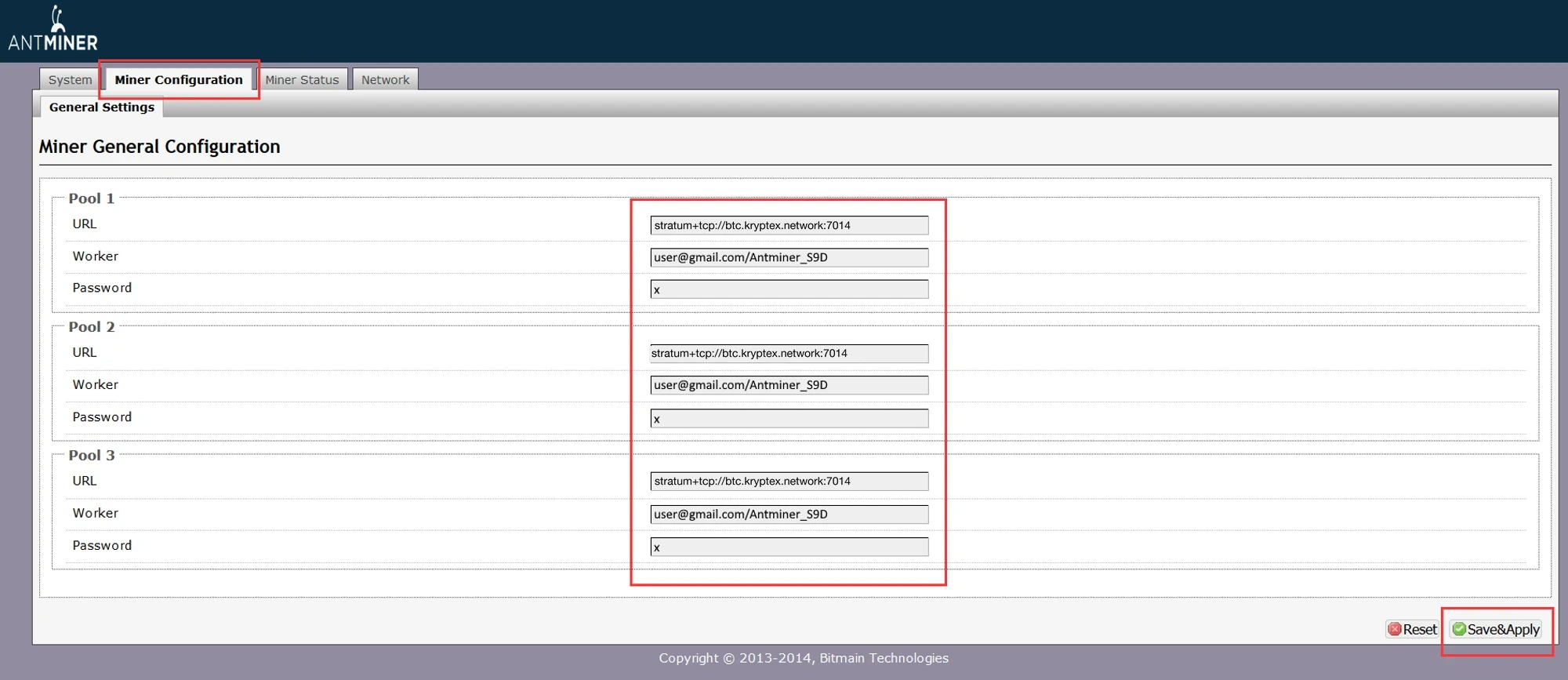
Access the control panel of your ASIC.
Open the settings section, typically labeled as "Miner Configuration" or "Settings".
Use the following settings:
- BTC mining pool URL:
stratum+tcp://btc.kryptex.network:7014 - Worker: Add the wallet address for mining and the worker's name in the format
Your_Email/Worker_Name. The worker's name should include numbers and/or Latin letters without spaces or special characters. Separate the email and worker name with a slash "/". - Example:
user@gmail.com/Antminer_S9Dwhereuser@gmail.comis the email that you registered in Kryptex.Antminer_S9Dis the name of your worker in a free form. - Password: This field is optional. You can enter
xor leave it blank.
- BTC mining pool URL:
If necessary, replicate these settings across all three profiles. This ensures that the ASIC will automatically reconnect to the pool and resume operations in case of a connection loss.
Save and apply the settings, then reboot the ASIC.
Monitor Mining Activity in Your Kryptex Account
Once your ASIC has stabilized, a process that can take up to 20 minutes, and has successfully connected to the Kryptex Pool, you can check the work status and profit in your Kryptex personal account.
- Open your account on the Kryptex website — https://www.kryptex.com/.
- In the “Hardware” menu, under the “Pool Workers” section, you will find information on the operation of your ASIC. The pool updates data every 10 minutes and calculates your hashrate based on the shares you receive. It might take some time for the hashrate of your ASIC and your account to sync. This process can sometimes take several hours but does not impact your income. The pool compensates for each received share, not the hashrate.
- In the “Dashboard” menu, you can view your mining accurals.
Withdrawals from Your Kryptex Account
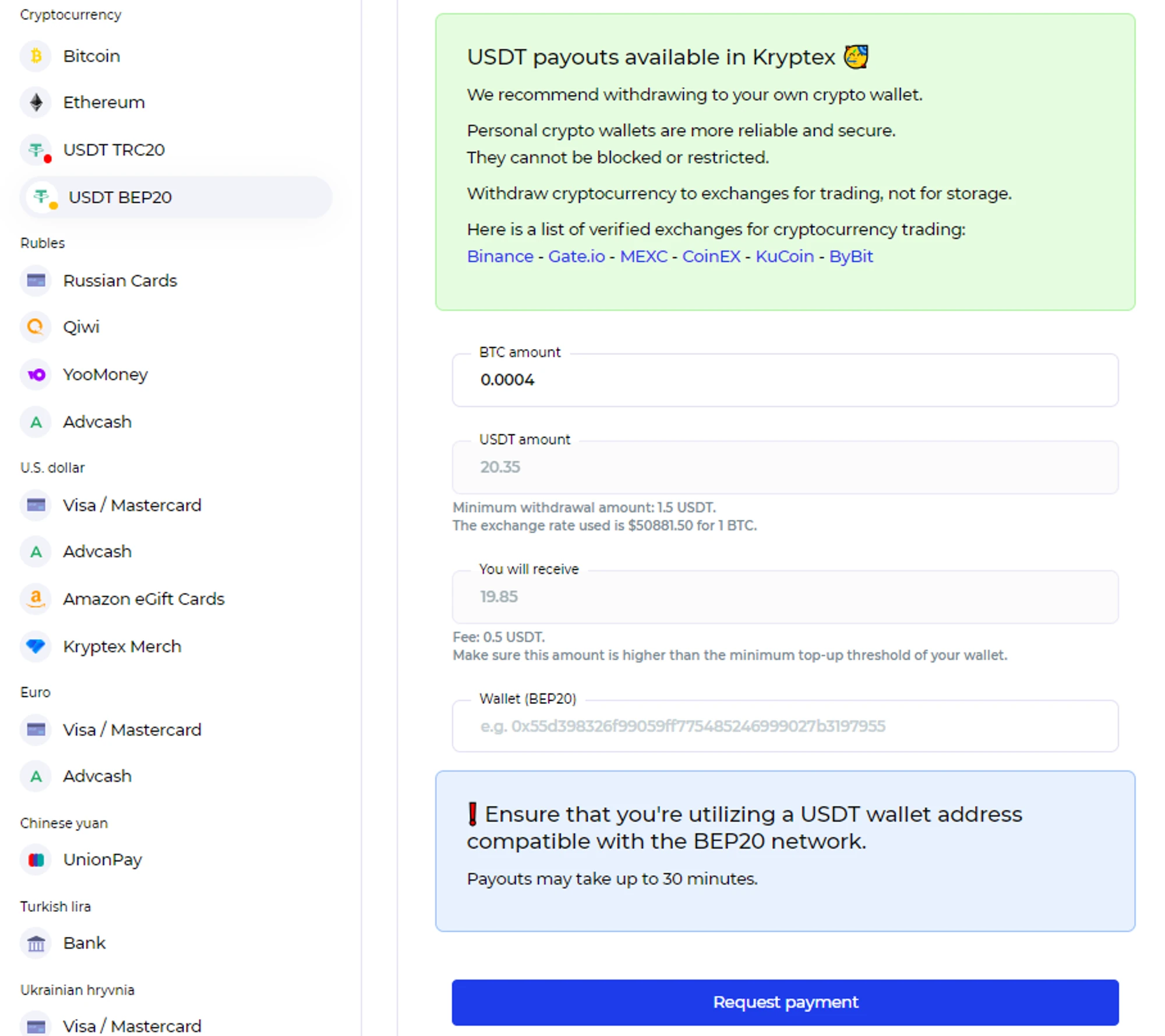
In your Kryptex personal account, you can withdraw your cryptocurrency in various ways: BTC (including Lightning), ETH, LTC, USDT (BEP20, TRC20), USDC (Polygon), BNB (Smart Chain), TRX.
We continually strive to incorporate more convenient and swift payment options.
Navigate to the "Request payment" menu.
Choose the payment method that suits you, check the rate, and make sure you understand the payment terms.
Specify the amount of Bitcoin you wish to withdraw. Kryptex isn't a bank or an exchanger: your balance is kept in bitcoin only. The rate and the exact payout amount are shown in the form before you confirm.
Fill in all necessary details, and double-check the wallet address where you request the payment. Always verify the copied wallet address.
Click "Request payment" and ensure confirmation via email. It is impossible to withdraw from kryptex account without email confirmation.
Need Help?
Have any questions, something is unclear, or you can’t connect?
Contact support — we're happy to assist!
Email support at support@kryptex.com.