How to mine QUAI SHA256
5/12/2025
QUAI SHA256 — a SHA256 algorithm fork of the QUAI coin within the QUAI SOAP project.
Quai is a high-throughput cryptocurrency. It runs on its own blockchain and processes over 50,000 transactions per second without compromising decentralization. The value of the project lies in fast and low-cost transactions. Its goal is to build a decentralized global payment system capable of handling massive transaction volumes.
SOAP (Subsidized Open-market Acquisition Protocol) is designed to ensure the resilience and security of the QUAI network. QUAI SOAP sells partner-chain tokens on the market and buys QUAI. Miners are rewarded in QUAI coins for their work.
⛏️ Mine QUAI SHA256 — https://pool.kryptex.com/quai-sha256
🔗 QUAI SHA256 Pool URLs:
- Global:
stratum+tcp://quai-sha256.kryptex.network:7044 - EU:
stratum+tcp://quai-sha256-eu.kryptex.network:7044 - US:
stratum+tcp://quai-sha256-us.kryptex.network:7044 - SG:
stratum+tcp://quai-sha256-sg.kryptex.network:7044 - RU:
stratum+tcp://quai-sha256-ru.kryptex.network:7044
Supported Miners
To mine QUAI SHA256, you need an SHA256 or SHA256Boost ASIC.
- Bitmain Antminer
- Whatsminer MicroBT
- Canaan Avalon
- Innosilicon
- Fluminer
- Bitdeer
- Ebang
- Bitaxe
- Aixin
This is only a partial list of ASIC manufacturers. Kryptex Pool supports any SHA256 ASIC miner.
QUAI can also be mined with Scrypt ASICs or GPUs using the QUAI ProgPow and QUAI KawPow algorithms.
Register a QUAI Wallet
To mine QUAI SHA256, you need to register a QUAI wallet address.
- Create a personal wallet address in Pelagus Wallet — https://pelaguswallet.io/
- A wallet address can also be obtained from exchanges: MEXC, Gate.io, CoinEX
👉 Detailed guide on how to register a QUAI wallet address.
We strongly recommend using only personal wallets for mining and long-term storage.
Connecting to the QUAI SHA256 Pool: Step-by-Step Guide
| Region | URL | Wallet Template | Password |
|---|---|---|---|
| Global | quai-sha256.kryptex.network:7044 |
wallet.worker |
x or leave blank |
| EU | quai-sha256-eu.kryptex.network:7044 |
wallet.worker |
x or leave blank |
| US | quai-sha256-us.kryptex.network:7044 |
wallet.worker |
x or leave blank |
| SG | quai-sha256-sg.kryptex.network:7044 |
wallet.worker |
x or leave blank |
| RU | quai-sha256-ru.kryptex.network:7044 |
wallet.worker |
x or leave blank |
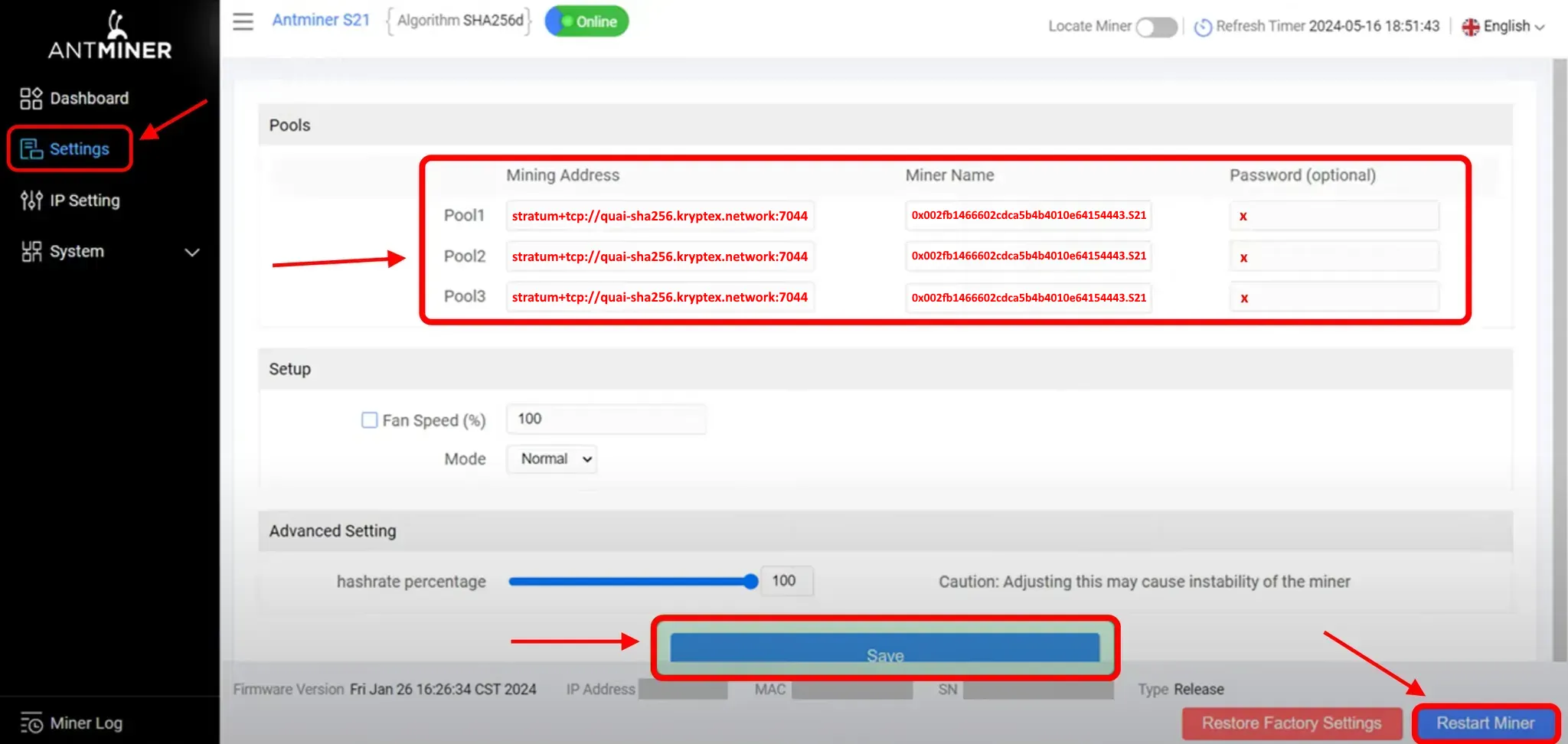
Let's take the Bitmain Antminer ASIC as an example.
Access the control panel of your ASIC.
Navigate to the settings section, typically labeled "Miner Configuration" or "Settings".
Input the following settings:
- URL of QUAI SHA256 mining pool:
stratum+tcp://quai-sha256.kryptex.network:7044 - Worker: Enter the wallet address for mining and the worker name in the format
Wallet_Address.Worker_Name. The worker's name should comprise numbers and Latin letters, excluding spaces or special characters. - For instance:
0x002fb1466602cdca5b4b4010e64154443417bccd.S21where:0x002fb1466602cdca5b4b4010e64154443417bccd— represents the QUAI wallet address.S21is the chosen name for your worker in free form. - Password: This field is optional. You can either enter
xor leave it blank.
- URL of QUAI SHA256 mining pool:
Replicate these settings across all three profiles. This ensures that the ASIC will reconnect to the pool and resume operations in case of a connection loss.
Save and apply the settings, then reboot the ASIC.
Monitoring Your Pool Mining Activity
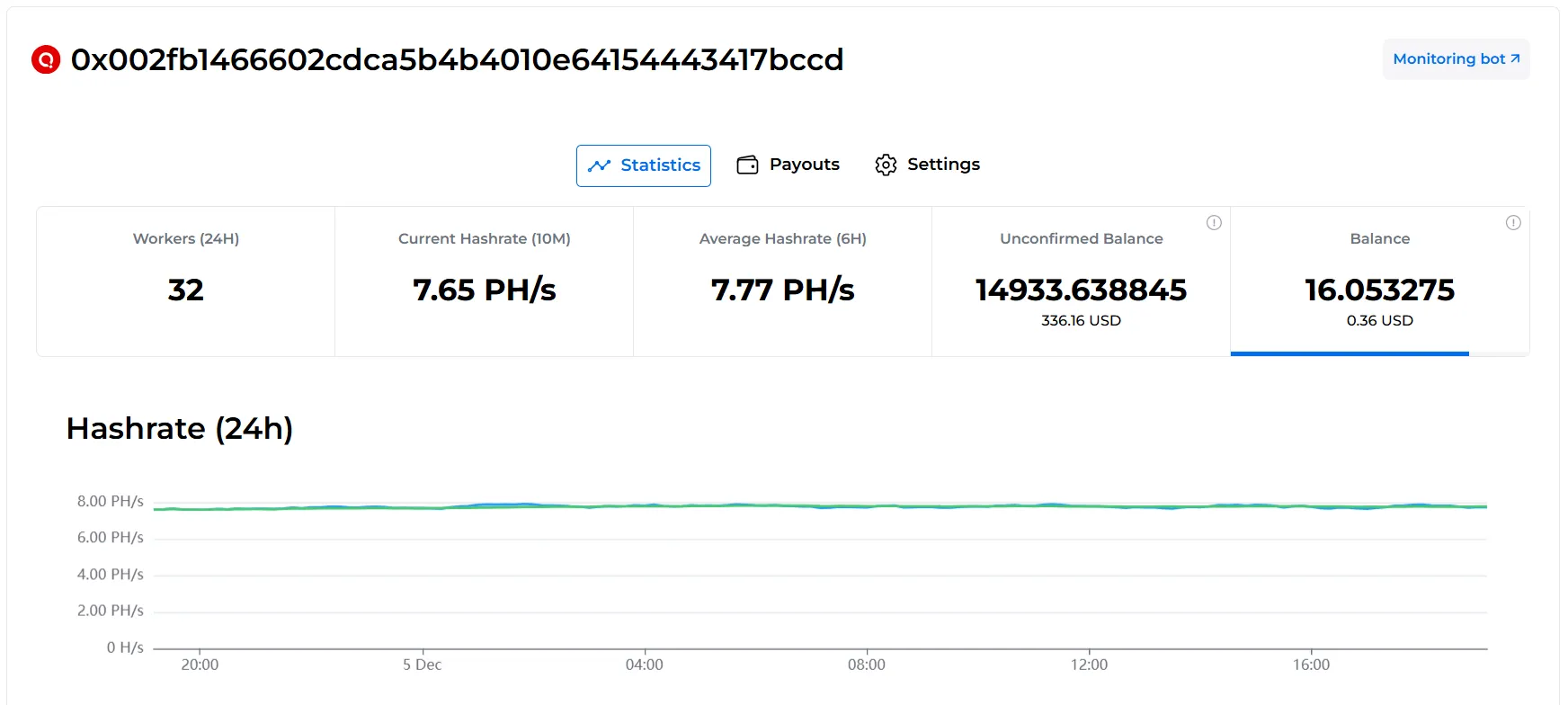
Once your ASIC has stabilized, which typically takes up to 20 minutes, and you have successfully connected to the Kryptex Pool, you can check the status and profitability of your mining efforts on the pool page.
Open the QUAI SHA256 Kryptex Pool — https://pool.kryptex.com/quai-sha256
Input your wallet address into the search field and press Enter.

View the statistics related to your ASIC on the pool.
For additional monitoring, you can also track the performance of your ASIC through our dedicated monitoring bot on Telegram: https://t.me/KryptexMonitoringBot.
Payouts
How to set the payout threshold?
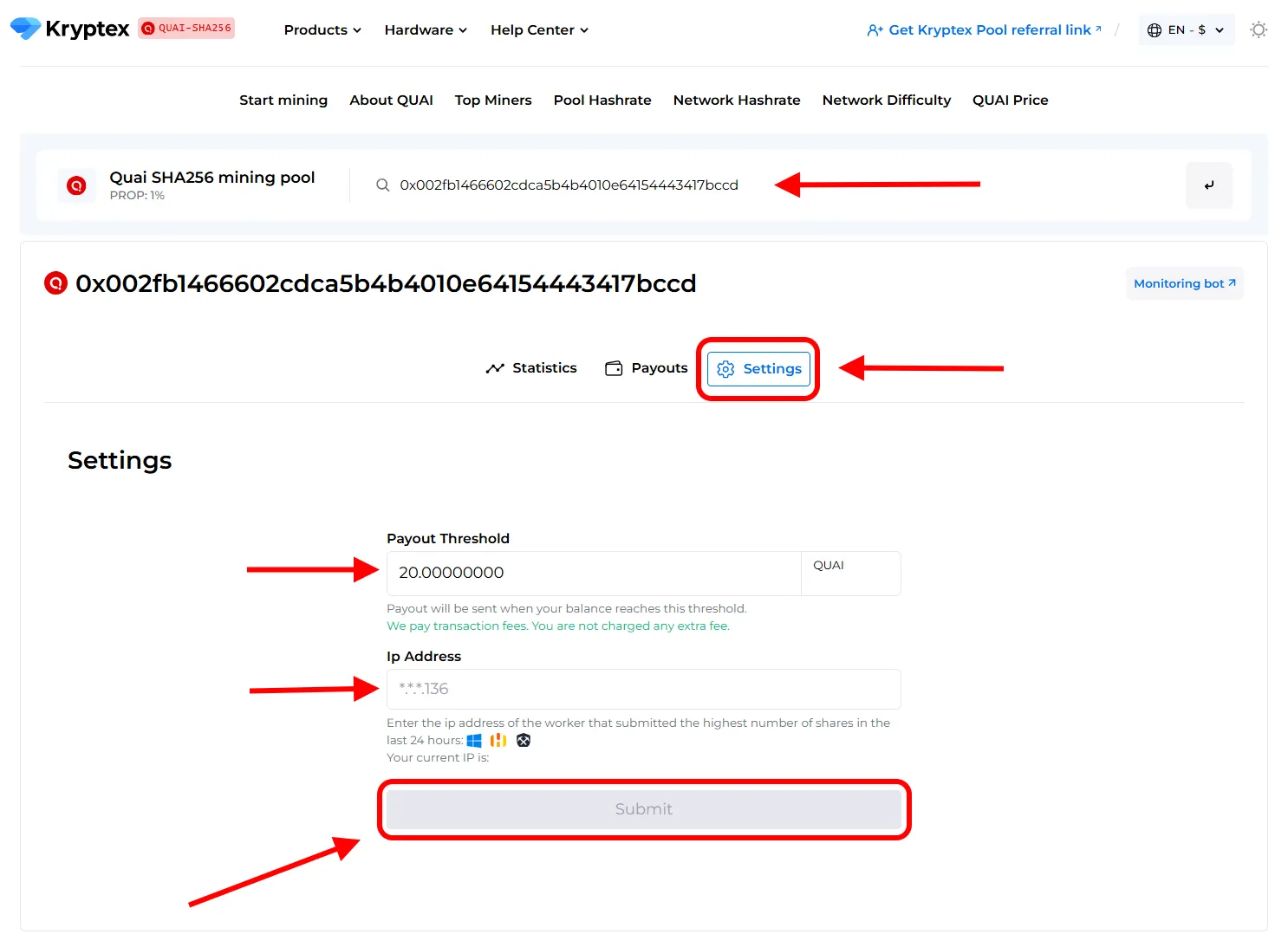
Open the pool page and enter your mining address;
Press the “Settings” button.
Set the desired “Payment Threshold”. Minimum and maximum payment threshold mentioned at the pool home page.
In the "Ip Address" cell, enter the IP address of the worker whose name the site prompts you. The external IP address of your ASIC. The IP address must end the same as indicated in the prompt on the site (see the last digits). Learn your IP here https://ipinfo.io/ip
Press the “Submit” button.
Track the status of your payments in the "Payouts" tab.
Need Help?
Have any questions, something is unclear, or you can’t connect?
Contact support — we're happy to assist!
Email support at support@kryptex.com.