How to mine Pearl (PRL)
۱۴۰۵/۶/۲۴
Pearl (PRL) is a Layer 1 blockchain with a Proof of Useful Work (PoUW) consensus that turns mining into productive AI computation.
Pearl miners run matrix multiplications — the core operation of modern neural networks. The same GPU work earns network rewards and produces results usable for AI training.
PRL can be traded on BigOne.
Supported GPUs
Pearl is mined on Nvidia (RTX 2000-series and newer — RTX 3000-series and newer work best), AMD RDNA2 (RX 6600–6950), and Intel Arc GPUs.
The algorithm relies on tensor cores, so Nvidia GPUs deliver the best efficiency. Each hardware type has its own miner — see the list below.
Register a Pearl wallet
To mine Pearl, you need a PRL wallet address.
- Create a personal wallet in the official Pearl Wallet.
- A wallet address is also available on the BigOne exchange.
👉 Detailed guide: How to create a Pearl (PRL) wallet.
We recommend using only personal wallets for mining and long-term storage.
Quick-start mining settings
⛏️ Mine Pearl — https://pool.kryptex.com/prl
🔗 Pearl Pool URLs:
- Global:
stratum+tcp://prl.kryptex.network:7048 - Europe:
stratum+tcp://prl-eu.kryptex.network:7048 - North America:
stratum+tcp://prl-us.kryptex.network:7048 - South America:
stratum+tcp://prl-br.kryptex.network:7048 - Singapore:
stratum+tcp://prl-sg.kryptex.network:7048 - Hong Kong:
stratum+tcp://prl-hk.kryptex.network:7048 - Russia:
stratum+tcp://prl-ru.kryptex.network:7048 - Middle East:
stratum+tcp://prl-ae.kryptex.network:7048
The current address and port are always listed on the pool page. The pool supports SSL — you can grab an SSL-ready command there too.
Mining modes: PPS+ and SOLO
The Pearl pool offers two modes — PPS+ (Pay Per Share Plus: stable, predictable income regardless of pool luck, the default) and SOLO (you get the whole block when you find one).
For SOLO mining, add the solo: prefix before your wallet address — for example, solo:prl1…. Learn more in What is SOLO mining.
Miners for Pearl
Pick a miner that matches your GPU. On the pool page, enter your wallet address and worker name — the pool builds a ready-to-use command (with your address, the algorithm, and region). Or build the BAT file from the examples below, plugging in your address and optionally swapping prl.kryptex.network for a regional address.
SRBMiner-MULTI
- GPUs: Nvidia RTX 2000-series and newer, datacenter L/B/H/A, plus AMD RDNA2 (RX 6600–6950).
- Highlights: gzip traffic compression (up to 80% less pool traffic), extensive overclocking.
- Download: Windows and Linux
- Command:
SRBMiner-MULTI.exe --disable-cpu --algorithm pearlhash --pool prl.kryptex.network:7048 --wallet WALLET_ADDRESS.WORKER(add--tls truefor SSL)
PeakMiner
- GPUs: Nvidia RTX 2000-series and newer, datacenter L/B/H/A, CMP, V- and P-series.
- Highlights: tuned for maximum Nvidia hashrate.
- Download: Windows and Linux
- Command:
peakminer.exe --coin pearl -o prl.kryptex.network:7048 -u WALLET_ADDRESS/WORKER(TCP/SSL auto-detected by port)
ForgeMiner
- GPUs: Nvidia RTX 2000–5000, RTX Pro, GTX 16XX, datacenter A/L/T, CMP.
- Highlights: maximum Nvidia hashrate, gzip traffic compression, extensive overclocking.
- Download: Windows and Linux
- Command:
forge.exe --algorithm pearlhash --pool prl.kryptex.network:7048 --wallet WALLET_ADDRESS.WORKER(for SSL:--pool ssl://prl.kryptex.network:7048)
ARCMiner
- GPUs: Intel Arc. Windows only (a separate build per card revision).
- Download: Windows
- Command:
arc-miner.exe --pool stratum+tcp://prl.kryptex.network:7048 --wallet WALLET_ADDRESS --worker WORKER(for SSL:stratum+ssl://)
Connecting to the Pearl Pool (Windows)
If you are an experienced miner, use our "How to start mining on Kryptex pools" guide. If you are a beginner and have never set up mining on your own — this guide is for you! Keep reading:
- Download a miner for your GPU (links in the "Miners for Pearl" section). Extract the archive to a convenient folder, for example, your desktop.
- Antivirus programs don't like miners. Pause your antivirus during the download, and after extracting, add the miner files to your exclusions. Disable PUA protection. Add only specific files, not the whole folder.
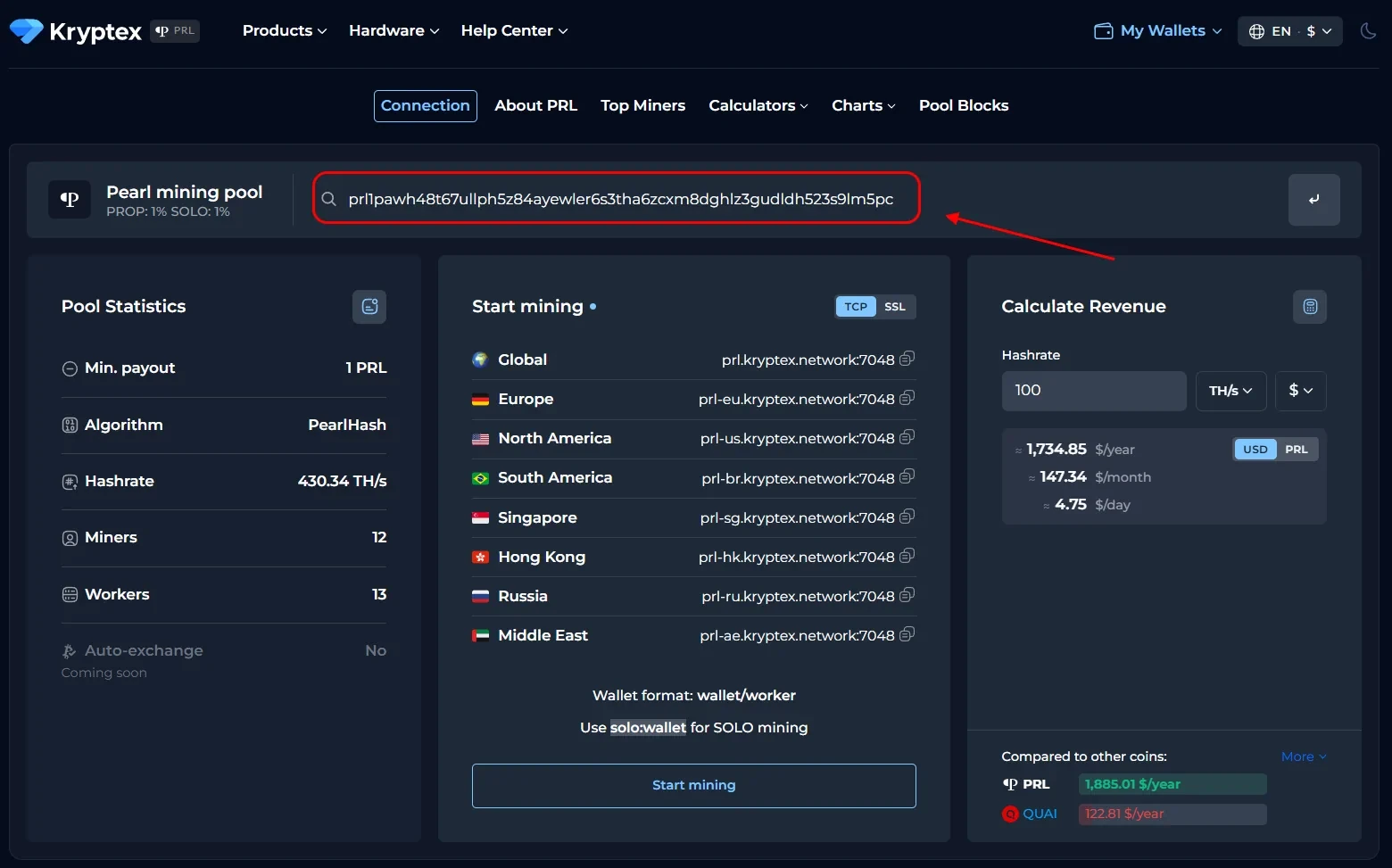
- Open the Pearl pool page — https://pool.kryptex.com/prl
- In the "Wallet address" field, enter the address you registered earlier. Address example:
prl1pawh48t67ullph5z84ayewler6s3tha6zcxm8dghlz3gudldh523s9lm5pc - In the "Worker name" field, enter the name of your mining rig, for example,
MyFirstRig. Use only Latin letters or numbers, no spaces. - Select your miner and the nearest region. Toggle SSL or SOLO if needed — the pool builds a ready command. Copy it from the "BAT file example" field.
- In the "Wallet address" field, enter the address you registered earlier. Address example:
- In the miner folder, create a
.txtdocument with Notepad, paste the command, and save. Then turn the file into a BAT file: rename the.txtextension to.bat. - Run the BAT file as administrator — mining will start.
- If your antivirus or firewall reports a suspicious file or asks for internet access at launch, allow access and add the miner files to the exclusions.
Mining on HiveOS
HiveOS has no built-in Pearl support, so you connect via a ready-made Flight Sheet with a custom miner. SRBMiner, PeakMiner, and ForgeMiner are available.
- In HiveOS, create a wallet for PRL: enter your address, name it, and confirm.
- On the pool page, open the HiveOS tab, pick a miner and region, and copy the ready Flight Sheet (JSON).
- In HiveOS, open the Flight Sheets tab → Import from Clipboard and paste the copied Flight Sheet.
- Select your PRL wallet and confirm the Flight Sheet creation.
- Select your rigs and workers, apply the new Flight Sheet (the "Rocket" button) — mining will start.
Mining with Docker
PeakMiner and ForgeMiner are available for Docker — a single command each. You need Docker and the NVIDIA Container Toolkit installed. Plug in your wallet address and worker name.
- PeakMiner:
docker run -d --gpus all --restart=unless-stopped --name kryptex-prl-peakminer peakminer/peakminer:latest --coin pearl -o stratum+tcp://prl.kryptex.network:7048 -u WALLET_ADDRESS/WORKER - ForgeMiner:
docker run -d --gpus all --restart=unless-stopped --name kryptex-prl-forge hashraptor/forge:latest --algorithm pearl --pool prl.kryptex.network:7048 --wallet WALLET_ADDRESS --worker WORKER
Monitoring Your Pool Mining Activity
Open the Pearl pool page — https://pool.kryptex.com/prl
Paste your wallet address into the search field and press Enter.
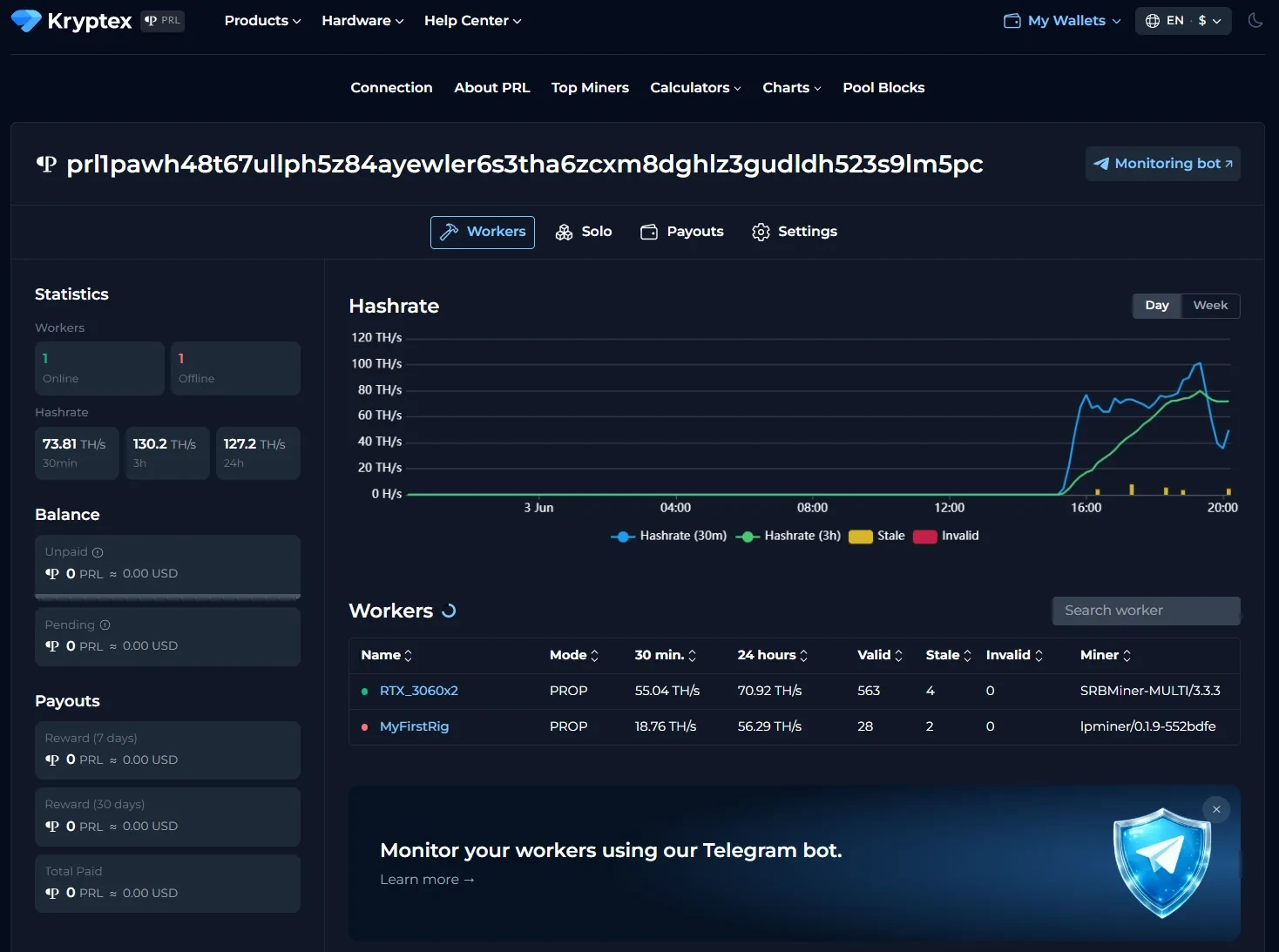
A page with the statistics of your wallet and mining rigs will open. Statistics appear 10–15 minutes after mining starts.
Payouts
Payouts are sent automatically once an hour when your threshold is reached.
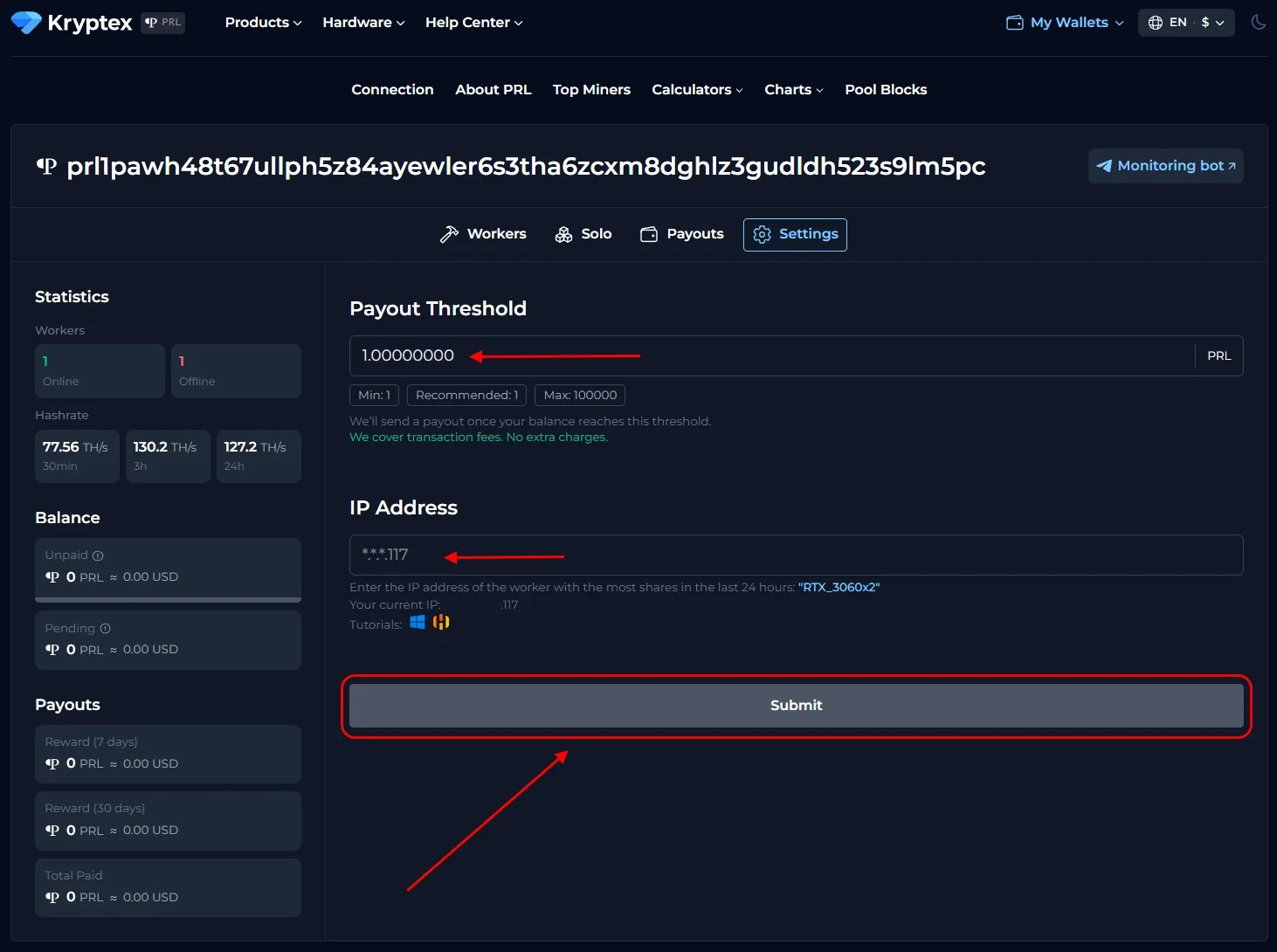
How to set the payout threshold?
Open the pool page and enter the address you mine to.
Open the "Settings" section.
Set the amount in the "Payment Threshold" field. The minimum and maximum thresholds are listed on the pool home page. There is no transaction fee — Kryptex pays it for you 🖤
In the "IP address" field, enter the IP of the rig whose name the site prompts. The IP must end the same way as in the prompt (check the last digits). Find your IP here: https://ipinfo.io/ip
Click "Submit".
Track your payouts in the "Payouts" tab.
Need Help?
Have any questions, something unclear, or trouble connecting?
Contact support — we're happy to assist!
- Support Ticket.
- Telegram Support.
- Discord Support.
- Email support at support@kryptex.com.