Xelis Hardfork: Switching to XelisHashV3
2026. 3. 30.
The Xelis hardfork is scheduled at block 3,282,150 — approximately December 13 at ~17:00 UTC (+0) but can be earlier/later by a few hours, depending on how quickly the block is mined.
A hard fork is a significant change to the blockchain protocol, rendering the old protocol no longer supported. Such changes require agreement and migration of all network participants to the new version. Hard forks are utilized to improve the protocol, fix errors, settle community disputes, or implement new features.
The developers of Rigel Miner and SRBMiner‑Multi have prepared their software for the XelisHashV3 hardfork. We will provide guidance to help you configure your mining rigs for a smooth transition to the new algorithm.
Kryptex Pool supports automatic switching of Iron Fish to the XelisHashV3 algorithm during the hardfork when using Rigel or SRBMiner‑Multi.
Quick-start mining settings
⛏️ Mine XEL XelisHashV3 — https://pool.kryptex.com/xel
🔗 XEL XelisHashV3 Pool URLs:
- Global:
stratum+tcp://xel.kryptex.network:7019 - EU:
stratum+tcp://xel-eu.kryptex.network:7019 - US:
stratum+tcp://xel-us.kryptex.network:7019 - SG:
stratum+tcp://xel-sg.kryptex.network:7019 - RU:
stratum+tcp://xel-ru.kryptex.network:7019
Rigel Miner. XelisHashV3 Switching
Rigel Miner Automatic Switching to XelisHashV3
This method suits those who wish to switch to the new algorithm smoothly without manual switching.
Download the latest version of the miner Rigel.
Launch the miner with the old
xelishashv2algorithm and the--enable-forkparameter for automatic switching.rigel.exe -a xelishashv2 -o stratum+tcp://xel.kryptex.network:7019 -u wallet_address.worker_name --enable-forkDuring the hardfork, the Kryptex Pool will send a message to the miner, and Rigel will automatically switch to the new algorithm.
Rigel Miner Manual Switching to XelisHashV3
This method is for those who prefer to manually control the switch to the new algorithm. After the hardfork, you will need to restart the miner yourself.
Get the latest version of the miner Rigel.
Create a .bat file configured for the
XelisHashV3algorithm.rigel.exe -a xelishashv3 -o stratum+tcp://xel.kryptex.network:7019 -u wallet_address.worker_nameAfter the hardfork, launch the prepared .bat file which you prepared for the
XelisHashV3algorithm.
You can download the Rigel miner along with a preconfigured .bat file for the Kryptex Pool and the new algorithm.
SRBMiner-Multi. XelisHashV3 Switching
SRBMiner-Multi Automatic Switching to XelisHashV3
This method suits those who wish to switch to the new algorithm smoothly without manual switching.
Download the latest version of the miner SRBMiner-Multi 3.0.6+.
Launch the miner with the old
xelishashv2algorithm. The miner will switch to V3 automatically during the fork.SRBMiner-MULTI.exe --algorithm xelishashv2 --pool xel.kryptex.network:7019 --wallet wallet_address.worker_nameDuring the hardfork, the Kryptex Pool will send a message to the miner, and SRBMiner-Multi will automatically switch to the new algorithm.
SRBMiner-Multi Manual Switching to XelisHashV3
This method is for those who prefer to manually control the switch to the new algorithm. After the hardfork, you will need to restart the miner yourself.
Get the latest version of the miner SRBMiner-Multi 3.0.6+.
Create a .bat file configured for the
xelishashv3algorithm.SRBMiner-MULTI.exe --algorithm xelishashv3 --pool xel.kryptex.network:7019 --wallet wallet_address.worker_nameAfter the hardfork, launch the prepared .bat file which you prepared for the
xelishashv3algorithm.
You can download the SRBMiner-Multi miner along with a preconfigured .bat file for the Kryptex Pool and the new algorithm.
HiveOS — Switching to XelisHashV3
Switching Rigel to XelisHashV3 using HiveOS
Make sure you are using the latest Rigel miner version. If HiveOS has not yet managed to update the miner automatically, do it manually.
Open your Xelis flight sheet settings.
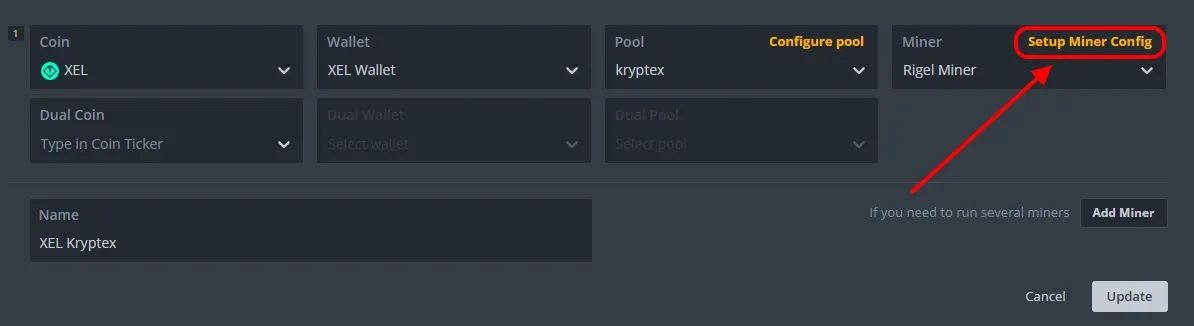
Choose “Rigel Miner” and click on “Setup Miner Config” next to the chosen miner.
Add the
--enable-forkparameter to the “Extra config arguments” line so that the miner will automatically switch to the new algorithm after the hard fork.If you want to switch to the new algorithm after a hard fork manually, select the new algorithm
xelishashv3in the list of algorithms, then--enable-forkdoes not need to be specified.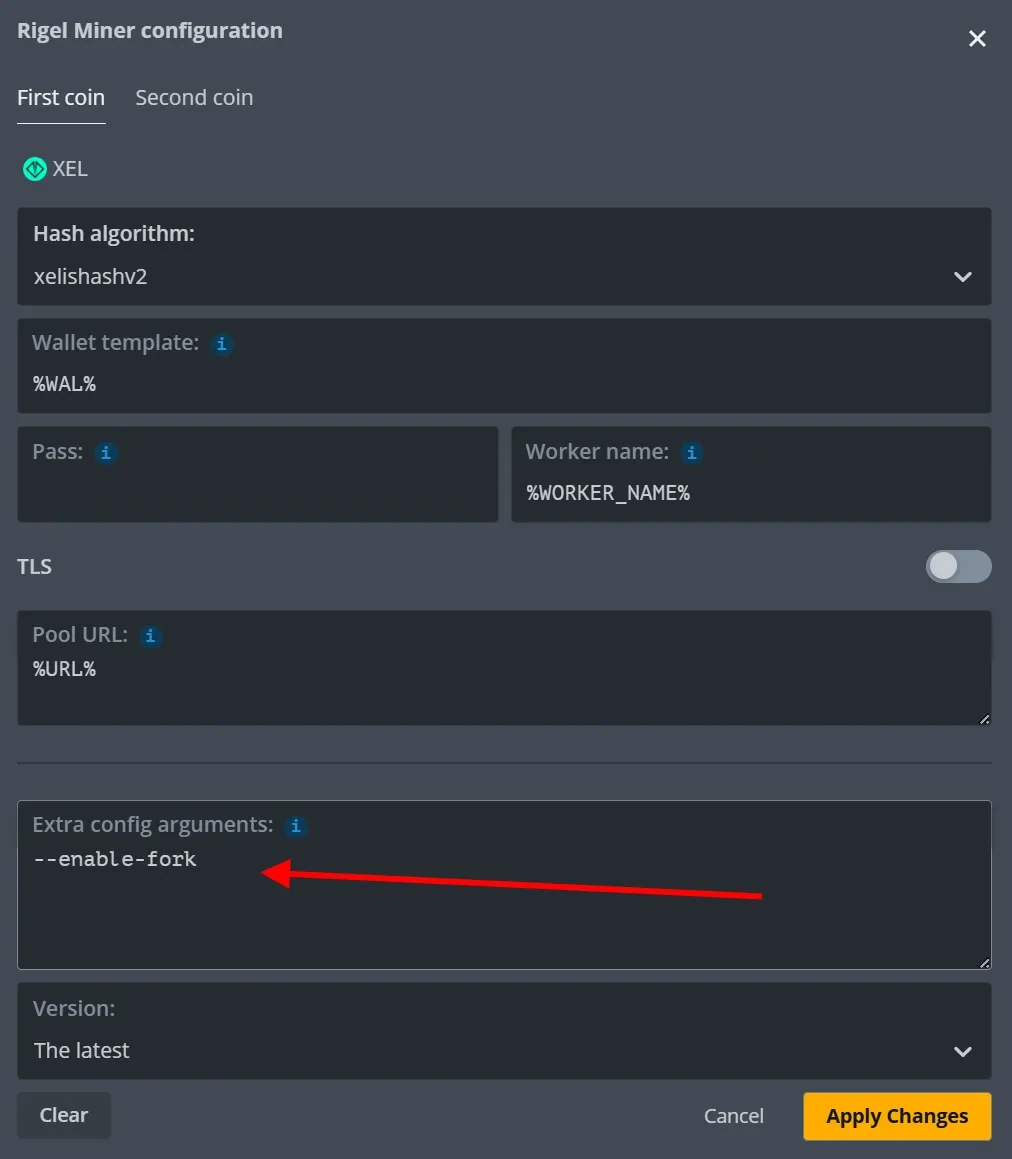
Optionally, specify overclocking.
Save the modifications, update the edited flight sheet, and apply it to your mining rigs.
Switching SRBMiner-Multi to XelisHashV3 using HiveOS
Make sure you are using the latest SRBMiner-Multi 3.0.6+ version. If HiveOS has not yet managed to update the miner automatically, do it manually.
Open your Xelis flight sheet settings.
Choose “SRBMiner-MULTI” and click on “Setup Miner Config” next to the chosen miner.
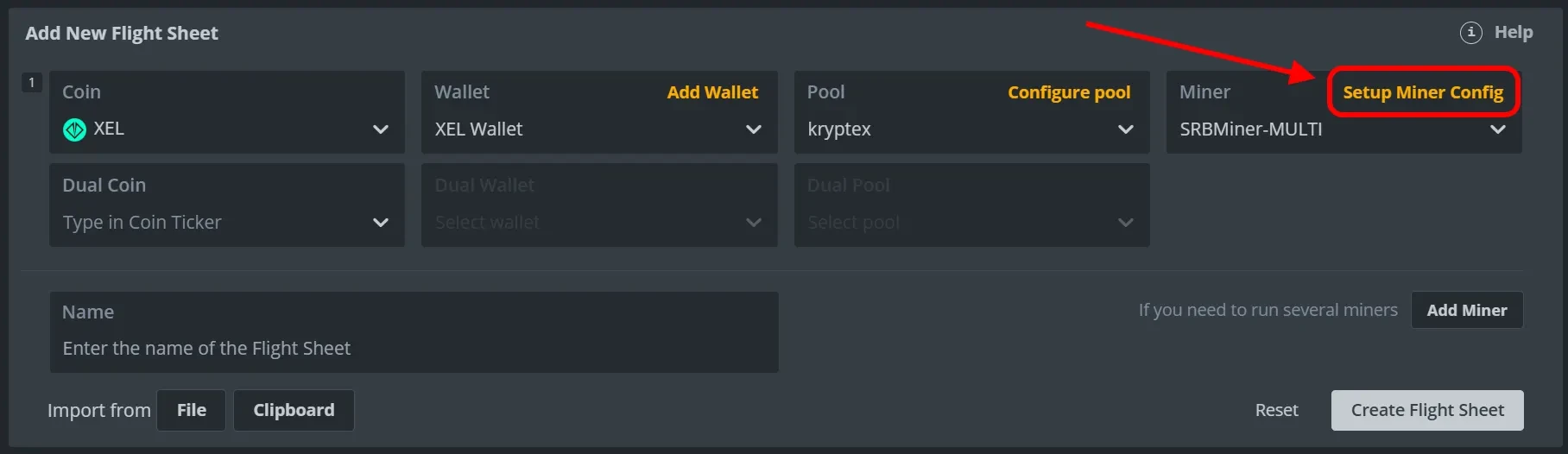
Make sure you’re using the latest version of SRBMiner‑Multi 3.0.6+. If HiveOS hasn’t updated the miner automatically yet, update it manually. Confirm that the algorithm is set to
xelishashv2— the miner will switch to V3 automatically during the fork.If you want to switch to the new algorithm after a hard fork manually, select the new algorithm
xelishashv3in the algorithms list.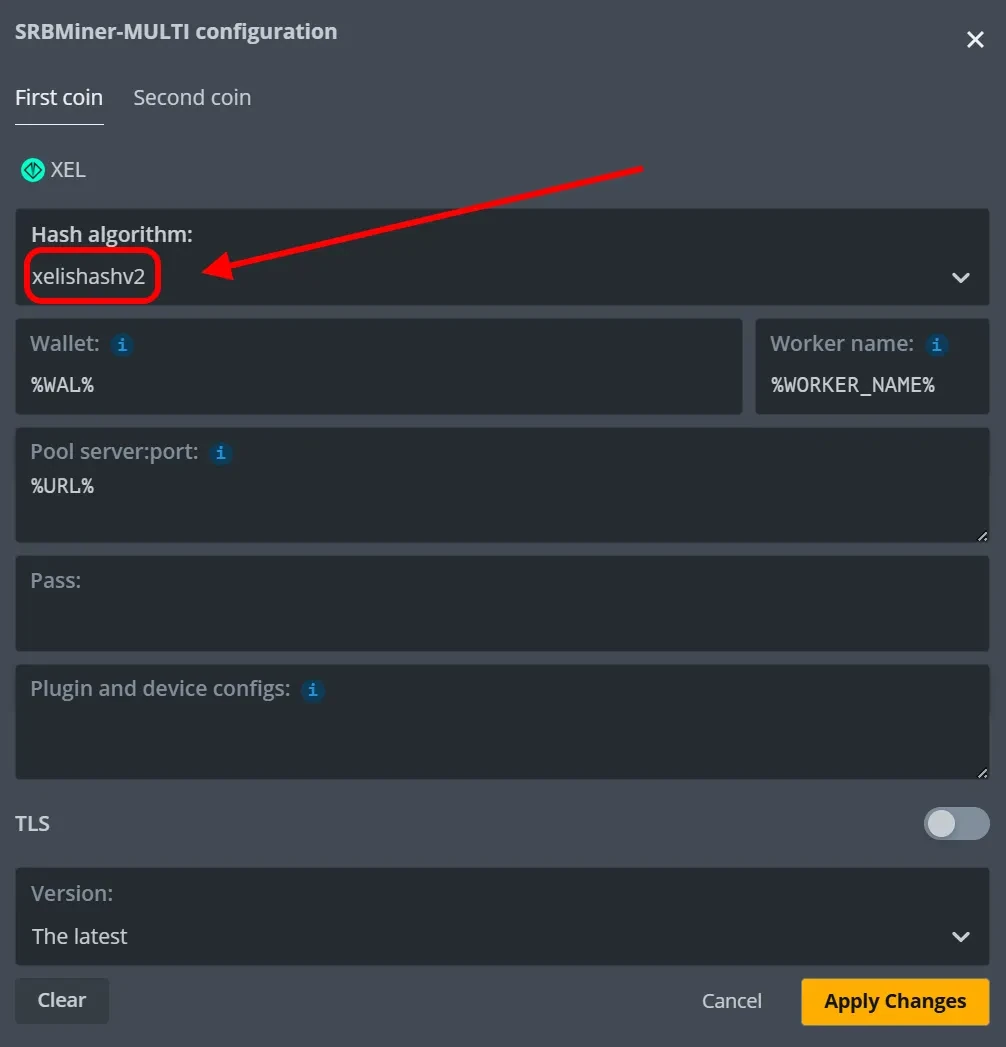
Save the modifications, update the edited flight sheet, and apply it to your mining rigs.
RaveOS — Switching to XelisHashV3
The RaveOS team has confirmed that they will automatically switch miners to the new XelisHashV3 algorithm, eliminating the need for miners to adjust settings on the Kryptex Pool.
We advise monitoring the switching process and conducting preliminary testing of overclocking settings for your graphics cards to ensure readiness when the switch occurs.
MMPOS — Switching to XelisHashV3
The MMPOS team reported that they have already updated the Rigel miner in their assembly.
To update the miner manually, select your miner profile, select the miner version “latest” and click “Update profile”. The latest version of the Rigel miner will be automatically selected.
Go to the “Advanced” tab, add the --enable-fork argument and click “Update profile” so that the miner will automatically switch to the new algorithm after the hard fork.
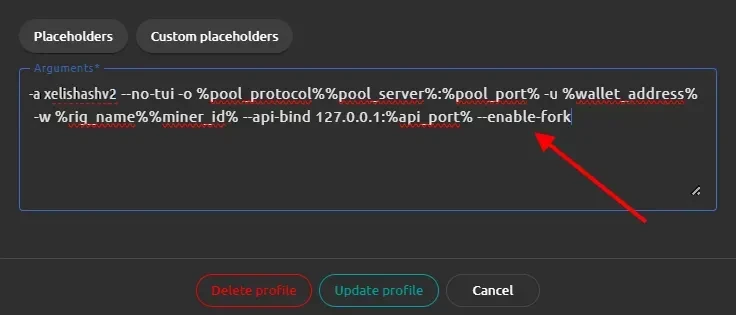
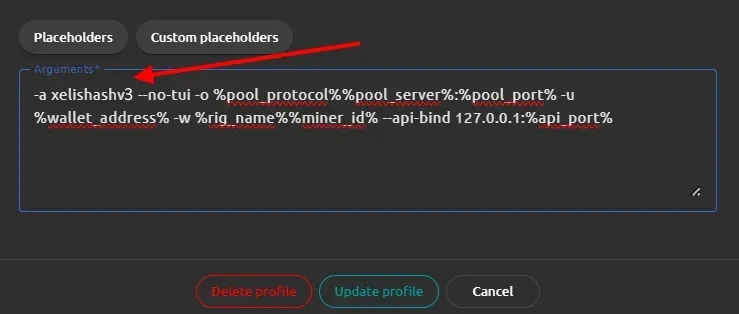
If you want to switch to a new algorithm after a hard fork manually, replace the algorithm xelishashv2with the new algorithm xelishashv3 in the argument line, then --enable-fork does not need to be specified.
Need Help?
Have any questions, something is unclear, or you can’t connect?
Contact support — we're happy to assist!
Email support at support@kryptex.com.