Bitmain Antminer L3, L3+, L3++ ASIC Miner
13.05.2026
Bitmain Antminer L3, L3+, and L3++ are ASIC miners for mining cryptocurrencies using the Scrypt algorithm, including Litecoin, Dogecoin, Pepecoin, Bellscoin and QUAI. Released by Bitmain in 2017–2018, these miners remain among the most popular Scrypt devices.
- Bitmain Antminer L3 250 MH/s
- Bitmain Antminer L3+ 504 MH/s
- Bitmain Antminer L3++ 580 MH/s
- Bitmain Antminer L3++ 596 MH/s
- Bitmain Antminer L3+ 600 MH/s
🔊 Noise Level:
The operating noise level is 62–76 dB: Antminer L3 — 62 dB, L3+ and L3++ — 76 dB. Due to the high noise level, the ASIC is not suitable for home use without a soundproof enclosure.
✅ Kryptex PPS+ Pool has tested and supports all Bitmain Antminer ASIC miners.
💎 On the Kryptex Pool, Scrypt ASIC miners can operate in merged mining mode (LTC+DOGE+PEP+BEL), allowing you to mine Litecoin, Dogecoin, Pepecoin, and Bellscoin simultaneously.
⛏️ Start Mining LTC+DOGE+PEP+BEL — https://pool.kryptex.com/ltc
🔗 LTC+DOGE+PEP+BEL Pool URL:
- Global:
stratum+tcp://ltc.kryptex.network:7016 - EU:
stratum+tcp://ltc-eu.kryptex.network:7016 - US:
stratum+tcp://ltc-us.kryptex.network:7016 - SG:
stratum+tcp://ltc-sg.kryptex.network:7016 - RU:
stratum+tcp://ltc-ru.kryptex.network:7016 - HK:
stratum+tcp://ltc-hk.kryptex.network:7016
Worker — your LTC wallet address.
Example: LgETtY86dfiWsgD3Mmcx1PtzhCdeYUVBaL.L3
⛏️ Start Mining QUAI Scrypt — https://pool.kryptex.com/quai-scrypt
🔗 QUAI Scrypt Pool URL:
- Global:
stratum+tcp://quai-scrypt.kryptex.network:7045 - EU:
stratum+tcp://quai-scrypt-eu.kryptex.network:7045 - US:
stratum+tcp://quai-scrypt-us.kryptex.network:7045 - SG:
stratum+tcp://quai-scrypt-sg.kryptex.network:7045 - RU:
stratum+tcp://quai-scrypt-ru.kryptex.network:7045 - HK:
stratum+tcp://quai-scrypt-hk.kryptex.network:7045
Worker — your QUAI wallet address.
Example: 0x002fb1466602cdca5b4b4010e64154443417bccd.L3
Bitmain Antminer L3, L3+, L3++ — Specifications and Dimensions
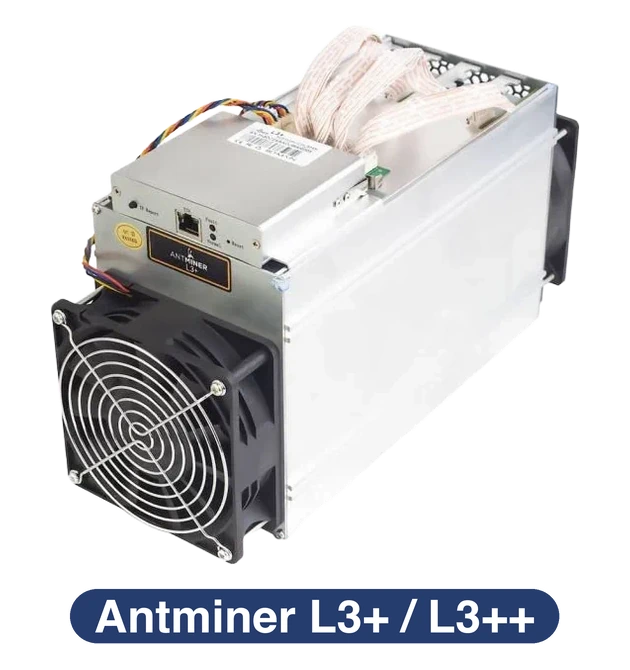
| Model | Algorithm | Coin | Hashrate | Power | Dimensions (cm) | Weight |
|---|---|---|---|---|---|---|
| Antminer L3 | Scrypt | LTC+DOGE+PEP+BEL, QUAI | 250 MH/s (±10%) | 400 W (±10%) | 33.5 x 13.5 x 15.5 | 3.8 kg |
| Antminer L3+ | Scrypt | LTC+DOGE+PEP+BEL, QUAI | 504 MH/s (±10%) | 800 W (±10%) | 35.0 x 13.5 x 15.5 | 4.3 kg |
| Antminer L3++ | Scrypt | LTC+DOGE+PEP+BEL, QUAI | 580 MH/s (±10%) | 942 W (±10%) | 35.0 x 13.5 x 15.5 | 4.3 kg |
| Antminer L3++ | Scrypt | LTC+DOGE+PEP+BEL, QUAI | 596 MH/s (±10%) | 1050 W (±10%) | 35.0 x 13.5 x 15.5 | 4.3 kg |
| Antminer L3+ | Scrypt | LTC+DOGE+PEP+BEL, QUAI | 600 MH/s (±10%) | 850 W (±10%) | 35.0 x 13.5 x 15.5 | 4.3 kg |
Profitability Bitmain Antminer L3, L3+, L3++
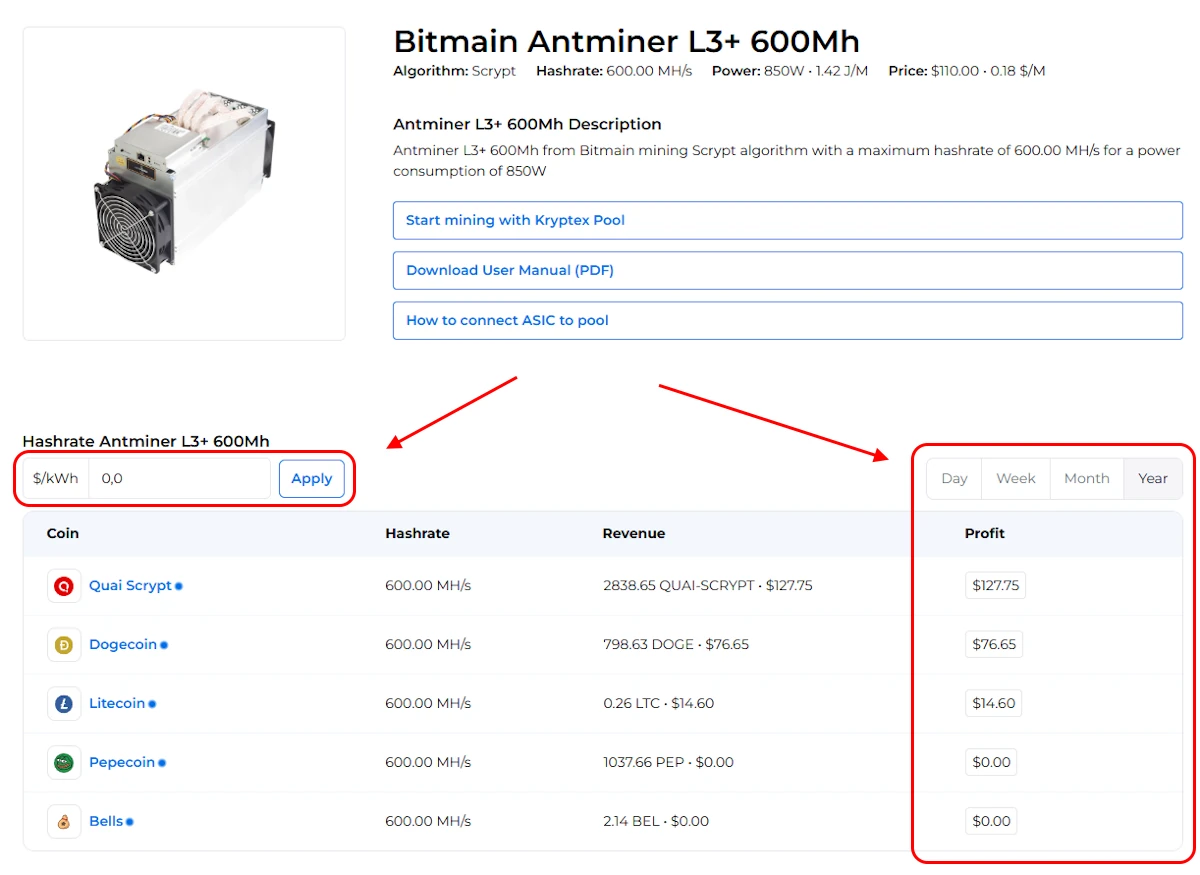
We recommend checking the current profitability in our mining calculator, where you can also calculate profitability based on your electricity rates.
| Model | Hashrate | Power | Profit ex. electricity |
|---|---|---|---|
| Antminer L3 | 250 MH/s (±10%) | 400 W (±10%) | see calculator |
| Antminer L3+ | 504 MH/s (±10%) | 800 W (±10%) | see calculator |
| Antminer L3++ | 580 MH/s (±10%) | 942 W (±10%) | see calculator |
| Antminer L3++ | 596 MH/s (±10%) | 1050 W (±10%) | see calculator |
| Antminer L3+ | 600 MH/s (±10%) | 850 W (±10%) | see calculator |
Setup Bitmain Antminer L3, L3+, L3++
Prepare the equipment:
- Connect the Antminer L3 to a power outlet.
- Connect an Ethernet cable (network cable) from your router to the ASIC.
Power on the device:
- Turn on the miner. You will hear the fans spinning, indicating that it has started.
Find the device's IP address:
On a computer connected to the same network as the ASIC, download the Bitmain Antminer IP Reporter Tool.
Launch the program and click "Start".
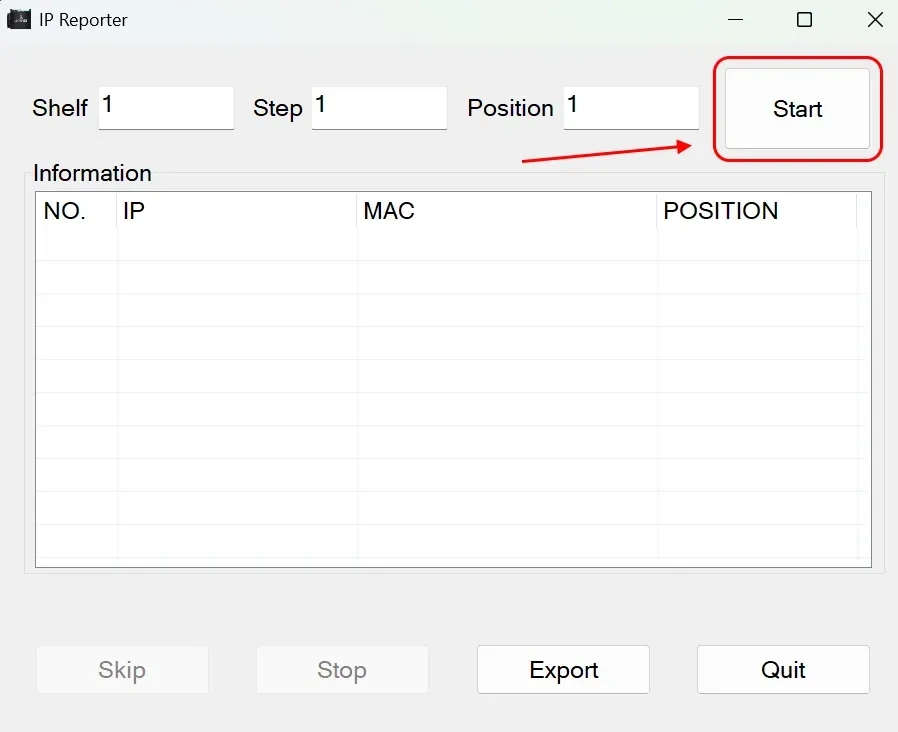
On the ASIC itself, press and hold the "IP Report" button for a few seconds.
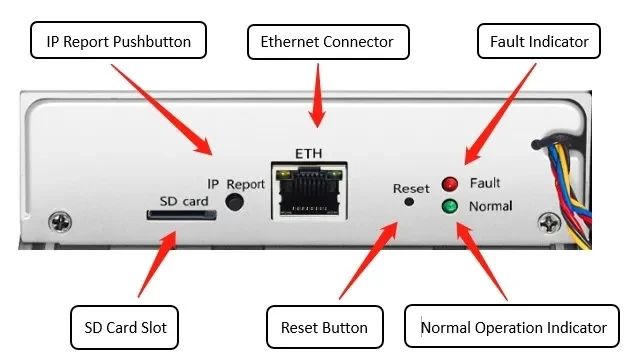
The utility will display your device's IP address.
Access the management interface:
Open a browser and enter the IP address you found. This will direct you to the Antminer management interface.
Log in using the default credentials: username:
root, password:root.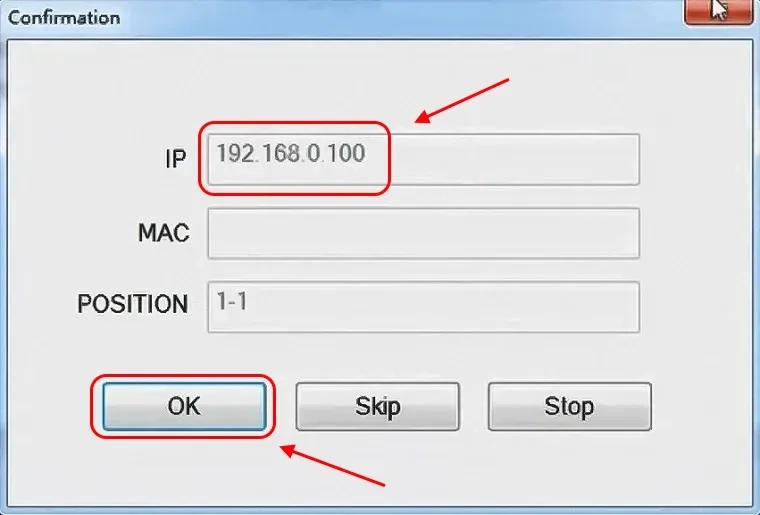
Configure pool settings:
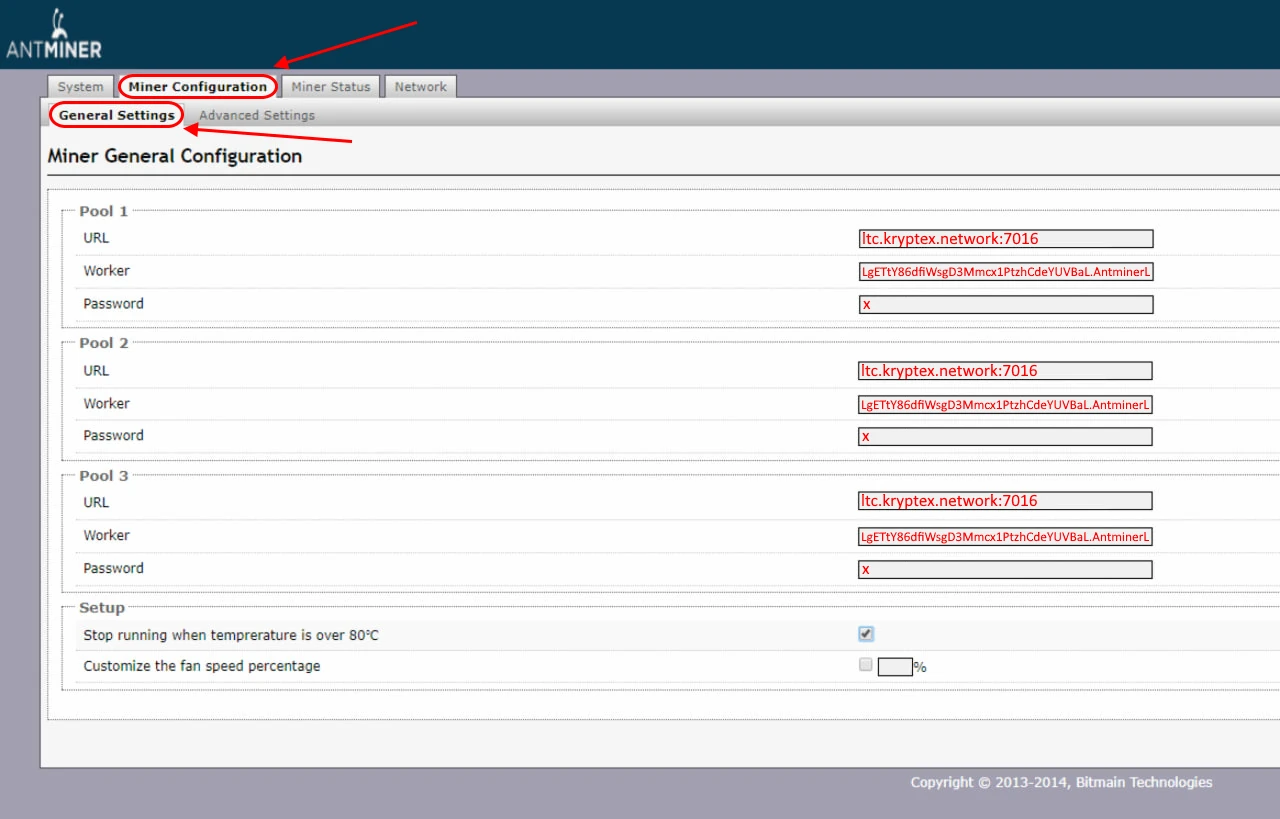
In the interface, navigate to the "Miner Configuration" section.
Enter the pool data (pool address, wallet address, and worker name). Use the data from the table below.
Worker — specify wallet and worker name in the format:
LgETtY86dfiWsgD3Mmcx1PtzhCdeYUVBaL.AntminerL3, whereLgETtY86dfiWsgD3Mmcx1PtzhCdeYUVBaLis your LTC wallet address,AntminerL3is the name of your ASIC.Coin Mining Address — Pool Address Miner Name — Wallet Address and Worker Password LTC+DOGE+BEL+PEP ltc.kryptex.network:7016orltc-eu.kryptex.network:7016orltc-ru.kryptex.network:7016orltc-us.kryptex.network:7016orltc-sg.kryptex.network:7016LTC_WALLET_ADDRESS.WORKER_NAMExor leave blankQUAI quai-scrypt.kryptex.network:7042orquai-scrypt-eu.kryptex.network:7042orquai-scrypt-ru.kryptex.network:7042orquai-scrypt-us.kryptex.network:7042orquai-scrypt-sh.kryptex.network:7042orquai-scrypt-hk.kryptex.network:7042QUAI_WALLET_ADDRESS.WORKER_NAMExor leave blank
Make sure to complete all three lines with the settings of the same pool. Click "Save & Apply" to save the settings and restart the ASIC.
Verify ASIC operation.
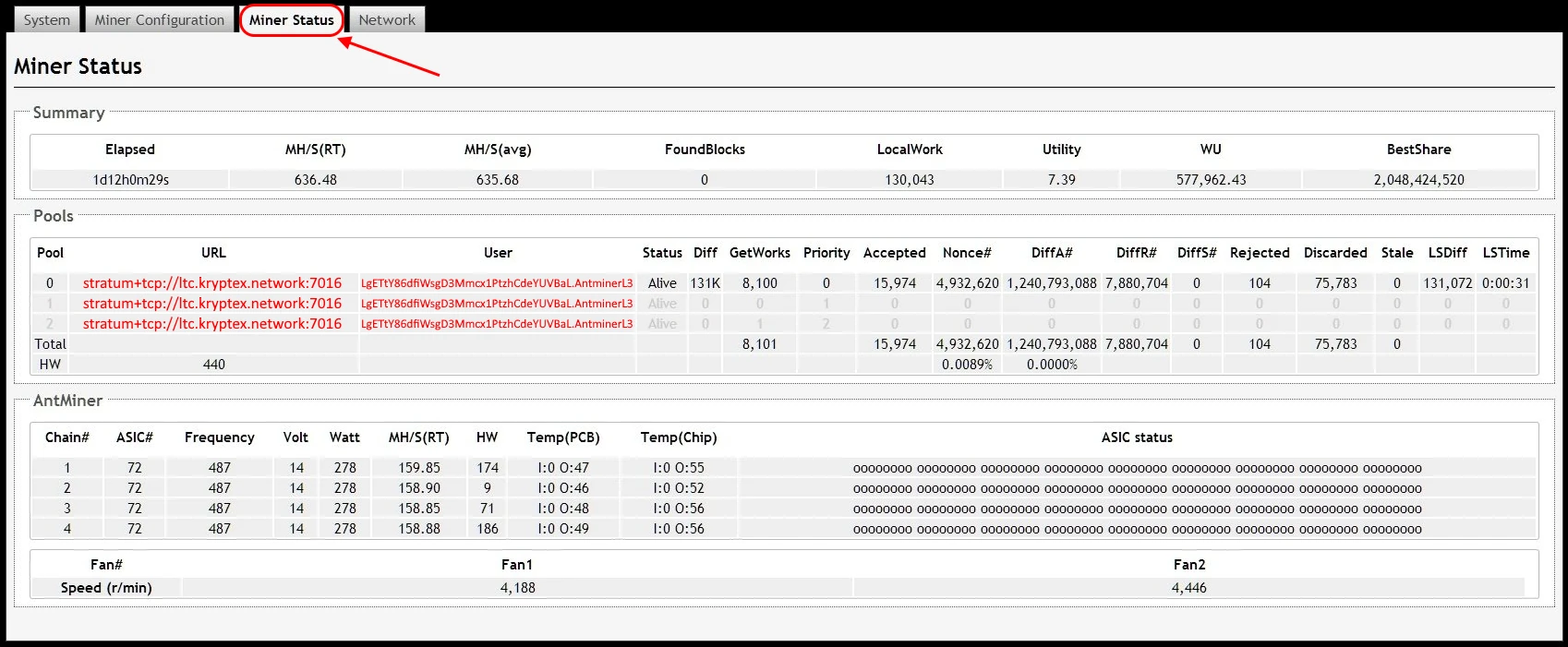
Once the restart is complete, wait a few minutes, then open the ASIC interface in your browser again.
On the "Miner Status" page, you'll see the current status: hash rate, uptime, temperature, and other metrics.
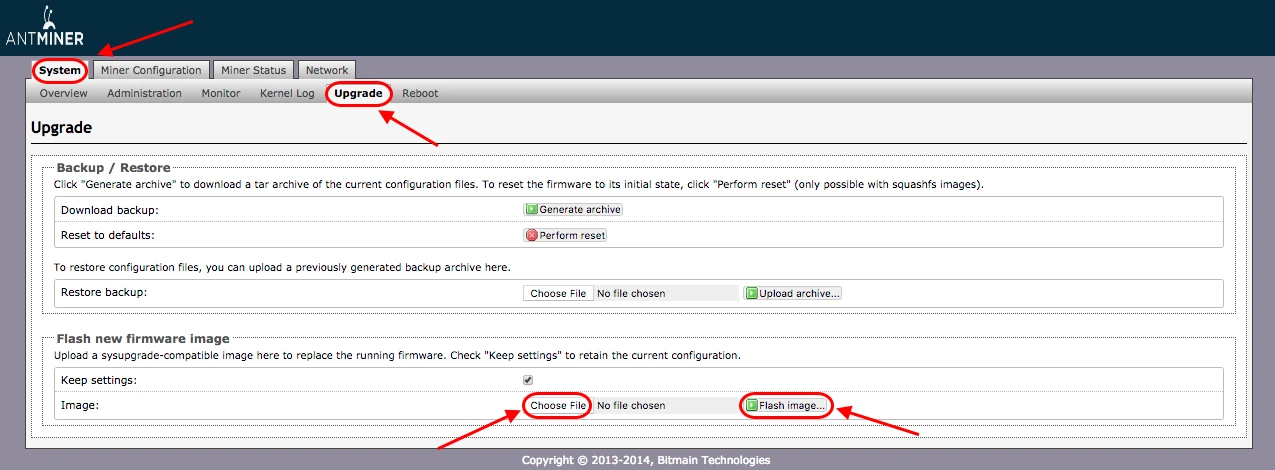
Firmware Update Bitmain Antminer L3, L3+, L3++
If necessary, you can update or change the firmware:
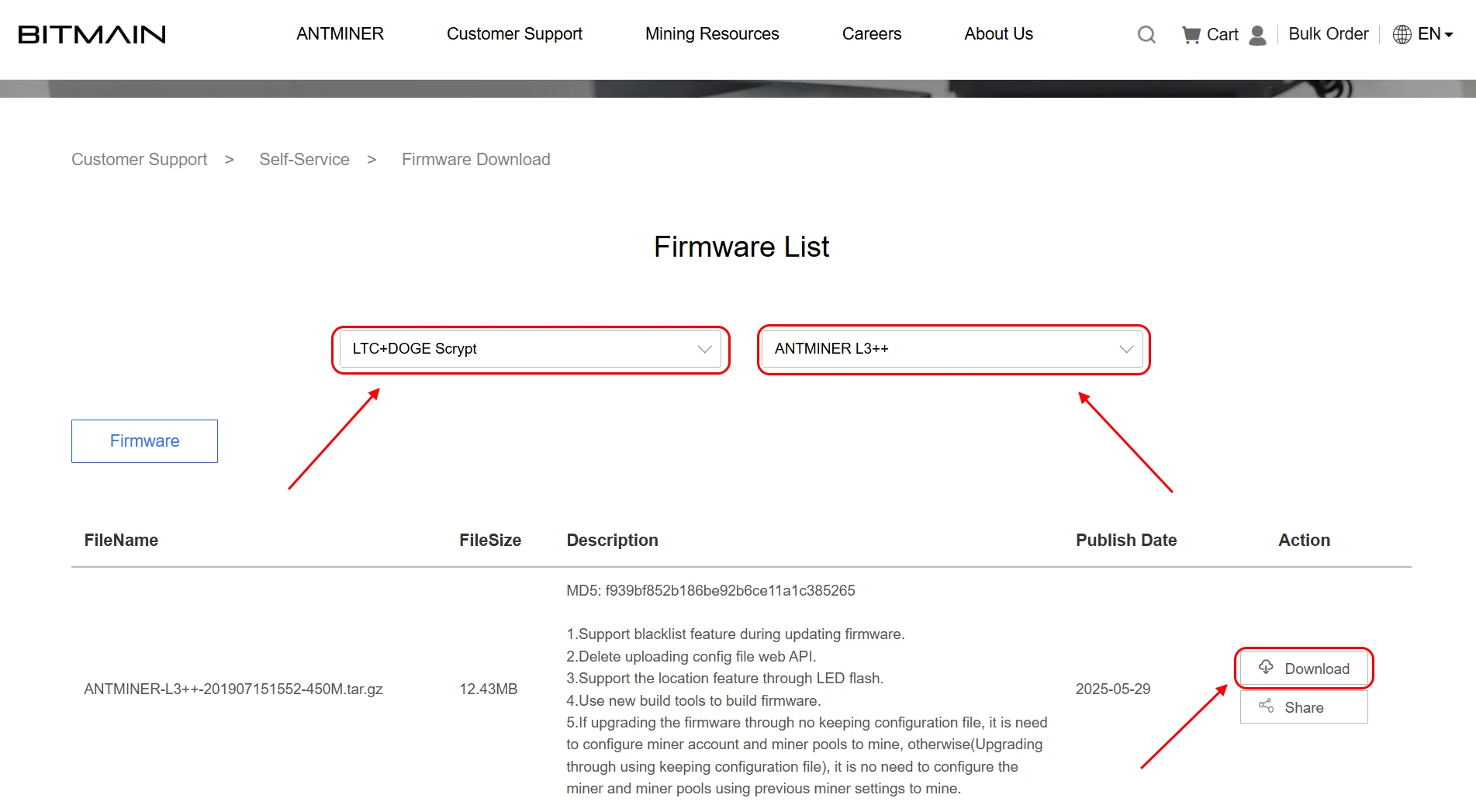
Visit the developer's website and open the firmware download page: https://shop.bitmain.com/support/download.
Select the algorithm for your ASIC — LTC+DOGE Scrypt, and choose your ASIC model from the list.
Download the firmware file by clicking the "Download" button.
Open the “System” → "Upgrade" page in the ASIC settings.
- Click the button to select the downloaded firmware file.
- Check "Keep settings" if you want to preserve the ASIC settings during the update.
Click "Flash image" and wait for the firmware update to complete. Do not disconnect the ASIC during the update.
🔥 Useful Articles
- How To Connect ASIC To The Pool? Step-By-Step Guide
- How to Extend the Lifespan of an ASIC Miner: Complete Guide
- Why Does Miner and Pool Hashrate Differs?
❓Frequently Asked Questions
What does the Antminer L3, L3+, L3++ mine?
The Antminer L3, L3+, and L3++ mine cryptocurrencies using the Scrypt algorithm: Litecoin (LTC), Dogecoin (DOGE), Pepecoin (PEP), and Bellscoin (BEL) — all simultaneously via merged mining. It also mines the QUAI coin using the Scrypt algorithm.
What is the difference between Antminer L3, L3+, and L3++?
The Antminer L3 is the base model with 250 MH/s and 400W. The Antminer L3+ offers 504 MH/s and 800W. The Antminer L3++ offers 580 MH/s and 942W. The Antminer L3++ offers 596 MH/s and 1050W. The Antminer L3+ is the most powerful: 600 MH/s and 850W.
How much power does the Antminer L3+ consume?
Antminer L3+ consumes about 800 W - 1000 W (±10%), depending on the modification.
How do I find the IP address of my Antminer L3?
Download and run the Bitmain IP Reporter Tool, click "Start", then press the "IP Report" button on the ASIC — the utility will display the device's IP address.
What are the default login credentials for the Antminer L3?
Username: root, password: root.
Is the Antminer L3+ noisy?
Yes, the Antminer L3+ and L3++ operate at 76 dB. For home use, a soundproof enclosure is recommended.
Does the Antminer L3 support the Kryptex Pool?
Yes, the Kryptex Pool fully supports all Antminer L3, L3+, and L3++ models.
Need Help?
Have any questions, something is unclear, or you can’t connect?
Contact support — we're happy to assist!
Email support at support@kryptex.com.